
Step 1: Sign in to ElevenLabs and find the subscription entry
Open elevenlabs.io (external source, for verification only, not an endorsement), click Log in, and sign in with your original email or the login methods the platform offers. Open Subscription from the avatar menu and verify the account in use.
On the pricing page, choose the ElevenCreative product line, then pick Starter, Creator or another plan, and verify Monthly billing.
Path:elevenlabs.io → Log in → avatar menu → Subscription
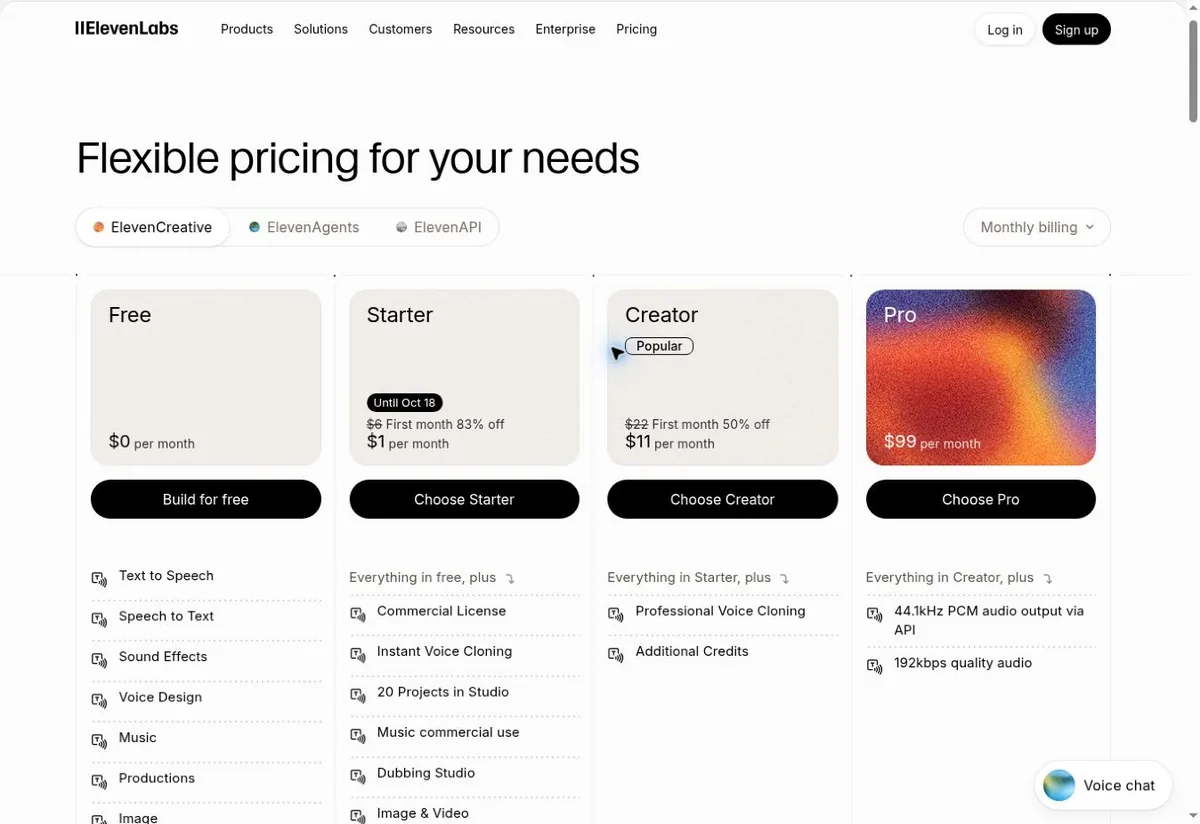 Illustration only, not an official screenshot, with no real information. The dollar prices and buttons in the image are for identification only; Starter at $1 for the first month and Creator at half price for the first month are fictional promo examples; actual purchases are settled on your account's checkout page.
Step 2: Choose a plan and billing cycle
The screenshots include promos, so don't write the first-month deal as a long-term price: Starter at $1 for the first month is a limited-time note, and Creator shows half price for the first month; eligibility, duration and the next renewal amount are subject to your own checkout page.
| Plan | Standard monthly | Annual or promo notes | Use case |
|---|---|---|---|
| Free | Free | No paid subscription | Try out the audio features |
| Starter | $6 per month regular | Illustration shows $1 for the first month (limited-time, fictional price) | Entry-level paid creation |
| Creator | $22 per month regular | Illustration shows $11 for the first month (half price, fictional) | More usage and creation features |
| Pro | $99 per month | Quoted per account | High-volume creation |
The page states that prices exclude applicable taxes; the actual first payment, the regular renewal amount and taxes are subject to the checkout page.
This tutorial uses the ElevenCreative web subscription as an example; entrances such as ElevenAgents and ElevenAPI have different pricing and billing logic, so confirm the product label before choosing. If you enable Usage based billing, Pay As You Go or add credits, you may keep being billed after the included allowance runs out — buying a plan alone should not be treated as having no extra usage fees.
Step 3: Fill in the payment details by matching your PIKABAO card info
Click Choose Starter / Choose Creator or pick a plan in Subscription to enter the official payment page; fill in the card details, matching them one to one, and verify the first-month and renewal amounts. The payment form fields map one-to-one onto your PIKABAO card face:
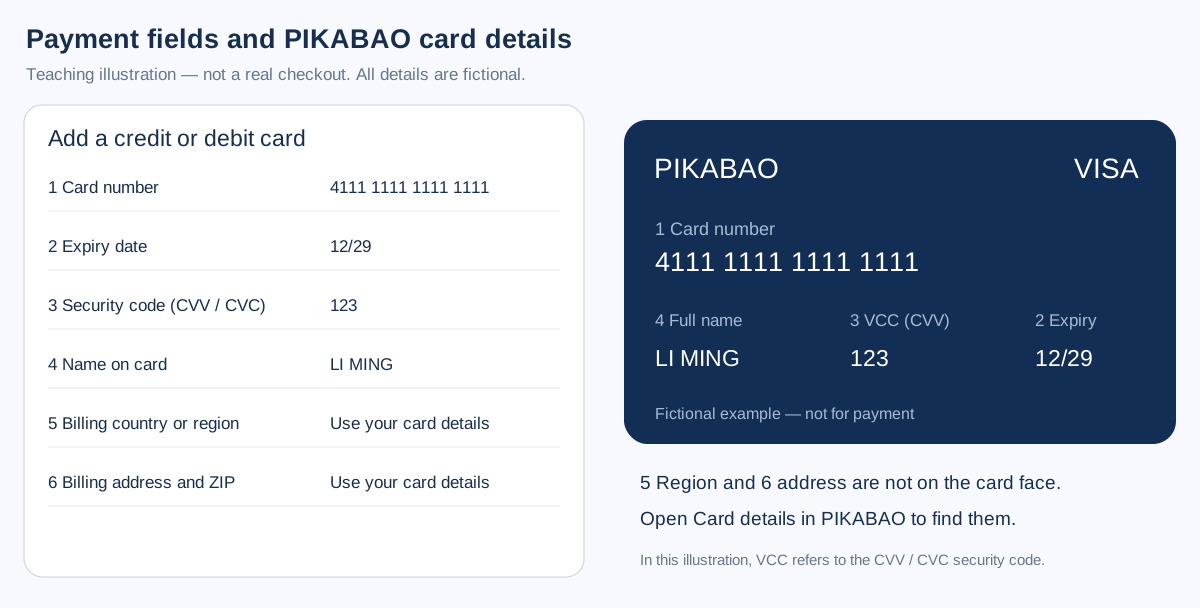 Teaching illustration, not an actual checkout screenshot from the platform; all data is fictional and must not be copied for payment. In this tutorial series the VCC label on the card face stands for the security code, which standard payment fields usually call CVV / CVC.
Copy the real details from your PIKABAO backend one by one and verify the last four digits of the card number: Card number → Card number; Expiry → MM/YY; Security code → CVV / CVC; Full name → Name on card.
Region and address are shown in card details in the PIKABAO backend; fill in Billing country, Street address, City, State / Province, ZIP / Postal code as actually required; don't invent an address or copy the teaching example. How to get them, see Where to find your card number, expiry and CVV, Where does the billing address come from; for what can block you when the address doesn't match, see Will the AVS billing-address check block my payment.
Choose a PIKABAO card that currently supports this merchant and subscription renewals. Whether the payment passes depends on the specific card, bank and merchant review; no guarantee that all card families work.
Step 4: Pay and confirm the subscription succeeded
Before clicking Subscribe, confirm three things: whether the plan is Starter or Creator, whether the cycle is monthly or yearly, and whether the amount shown is the promotional first month or the regular price. The promotion ends automatically and the next charge reverts to the regular rate.
If issuer verification appears, complete it in the way your card actually supports. Wait for the success state; don't keep resubmitting while the payment is processing — first check the account orders and the card transactions.
Go back to avatar menu → Subscription, confirm the plan name, current credits and the renewal date; check whether the features you need are enabled.
Step 5: Confirm membership and keep the payment receipts
In Subscription → Billing, find the billing management and invoice entries, and keep the official payment emails; cross-check the amounts and currency against your PIKABAO transaction records.
Find this card's spending records in the PIKABAO backend and check the merchant, amount, currency and status. Temporary authorizations, pending charges and the platform membership becoming active must be confirmed separately; don't assume membership succeeded just because you see a charge on the card.
Turn off auto-renewal
avatar menu → Subscription → Billing → Modify Plan → Cancel Plan → Proceed → Cancel Subscription, and confirm it shows scheduled to cancel at the end of the current billing cycle.
After the cancellation takes effect, the account reverts to Free and unused credits are lost; on the confirmation page don't accidentally click Resume subscription — that button undoes the cancellation request. Deleting the PIKABAO card, insufficient balance, uninstalling the app or signing out do not replace formally cancelling the subscription on the platform.
Payment failed or membership not showing: four categories to check
Incorrect details: verify the real card number, expiry, security code, name and the backend billing address. Fill in only the actual fields; don't put a verification code into the CVV.
Card or balance issue: confirm the card status, that the available balance covers the actual order plus applicable fees (including the expected difference between the first payment and the next renewal), and that the card currently supports this merchant. If the bank or merchant declines, stop retrying and investigate the reason.
Charged but not activated: check the login account, the current workspace, the order status, and whether the final activation completed. Provide the order number, time, amount and a redacted screenshot to the platform's official support; for card issues contact PIKABAO customer service — never send your security code.
Renewal amount changed: check taxes, the end of a promo, the annual cycle, additional usage, and seat or credit purchases. The regular price resuming after the first-month promo ends is the most common reason the amount goes up; refunds must be requested per the merchant's policy, and cancelling is not an automatic refund.
No card yet? Get one first: what to prepare to open a card
| Step | What to prepare | Fee and time |
|---|---|---|
| Register | Email + password, activated with a verification code | About 30 seconds, free |
| Identity verification | Submit genuine identity details under current first-issuance requirements; configure two-step verification separately | Subject to the actual review status and published terms |
| Two-step verification | Configure Google Authenticator as prompted to protect the account with time-based codes | Separate from identity verification; not a substitute for identity review |
| Account top-up | USDT, only the TRC20 / ERC20 chains are supported | $0 fee; minimum 20 USDT per transfer |
| Card issuance | Pick a BIN and initial balance (minimum 20 balance) | Issuing fee from $1 + 3% service fee on the balance |
Opening a card with a balance of 30 actually deducts $31.90 from your account (= 30 card balance + 30 × 3% service fee + $1 issuing fee), of which only $1.90 is a real charge; the other 30 remains spendable balance. The full breakdown of the four charges is in What does a card cost in total; the fee rates are at Pricing.
Editorial notes and maintenance
Figure 1 is an illustrative pricing page and Figure 2 is a precise field mockup we made ourselves; we did not obtain a real card-binding interface from a personal account, did not actually pay, and never present the mockups as official screenshots. Review date 2026-10-12. Plans, prices, buttons and eligibility may change; defer to what your own account's official pages actually show.
Other subscription and deposit guides: ChatGPT Subscription Guide, Claude Subscription Guide, Facebook Ads Tutorial, TikTok Ads Guide, Google Ads Guide, Binance P2P USDT purchases and PIKABAO deposits, OKX P2P USDT purchases and PIKABAO deposits, Coinbase USDT purchases and PIKABAO deposits, Runway subscription guide: payment and activation, Cursor subscription guide: payment and activation, Midjourney subscription guide: payment and activation, Gemini subscription guide: Google AI Pro activation, Perplexity Pro subscription guide: payment and activation, GitHub Copilot subscription guide: payment and activation, Notion AI subscription guide: Business plan activation; the full index of answers grouped by topic is in FAQ, and card selection and fees are on All card types overview.
Frequently asked questions
Is ElevenLabs always $1 per month after the first month?
No. Starter at $1 for the first month is a limited-time promo price, and Creator at half price for the first month is the same; when the promo ends, the regular monthly price resumes (Starter $6, Creator $22). When preparing card balance, estimate with the regular price so the next renewal doesn't fail for insufficient balance.
Does opening an ElevenLabs plan guarantee no further charges?
Not necessarily. After enabling Usage based billing, Pay As You Go or adding credits, you will keep being billed once the included allowance runs out; buying a plan alone should not be treated as having no extra usage fees. Keep these switches off when you don't need them.
Do my credits remain after cancelling my ElevenLabs subscription?
After the cancellation takes effect, the account reverts to Free and unused credits are lost; if you need to use up your credits, do so before the current cycle ends. The cancellation entry is at Subscription → Billing → Modify Plan.
What is Resume subscription on the ElevenLabs cancellation page?
It doesn't mean "resume cancelling"; it undoes the cancellation request and restores auto-renewal. If you only want to keep your benefits until the cycle ends after completing the cancellation flow, don't click this button.
Do I need to enter an address when binding my card to ElevenLabs? What if it's not on the card face?
Yes. The billing country or region and the address don't appear on the card face; open card details in the PIKABAO backend and fill in the payment-page fields with the matching pieces; don't invent an address. A mismatched address may be blocked by the AVS check.
ElevenLabs charged me but the plan didn't upgrade — what should I check first?
First verify the login account and the order status, then go back to Subscription to check the plan name, credits and renewal date. A temporary authorization on the card is not the same as the subscription being active — confirm the two separately; if the charge succeeded but it's still not activated, contact official support.
What's the relationship between ElevenAgents, ElevenAPI and ElevenCreative?
They are different product entrances under the same account, each with its own pricing and billing logic. Confirm the product label before subscribing; don't look for ElevenCreative plans inside another product line.
Is subscribing to ElevenLabs with a virtual card reliable?
On a BIN that supports this merchant it's a standard scenario: when the BIN's issuing country, merchant category and billing address line up, subscription payments generally go smoothly. Insufficient balance on the renewal day causes the renewal to fail, so leave room for the tax-inclusive amount.
The amount went up on the renewal day — is the platform overcharging?
The most common explanation is the regular price resuming after the first-month promo ends; then check taxes, the annual cycle and usage-based bills. The difference isn't a fee charged by the platform; it's tax added on the merchant's bill or the regular price resuming after a promo ends.
Get a card and get your ElevenLabs subscription running
Opening a card costs from $1 with no monthly fee; top-ups accept USDT only. Reserve balance at the regular rate (Starter $6, Creator $22), not at the $1 promotional price.