
TikTok Ads Payment Guide
Set up your personal or business ad account, creatives and budgets, then add a card or funds under the account’s available billing mode. Check card type, account review and payment verification separately, retain receipts and confirm actual delivery.
Step 1: Sign up and sign in to TikTok Ads Manager
Open ads.tiktok.com (external source, for reference only, not an endorsement), sign up for an ad account with your email or phone number, set a password, and complete the verification code. The sign-in flow for a regular TikTok user account and an advertising management account can differ — follow the flow the page offers.
Fill in your actual country/region, industry, registered business name, time zone, contact number, and currency; provide tax and verification materials as required. The business name should match the supporting documents you submit. After submitting, wait for the account review; you can build drafts in the meantime, but you can only deliver ads once approved.
Step 2: Create a campaign, ad group, and ad
On the Dashboard, click Create ad, or go to Campaign and click Create. Choose a promotion objective, then pick a creation mode your account supports. Manual mode usually has three levels: campaign → ad group → ad.
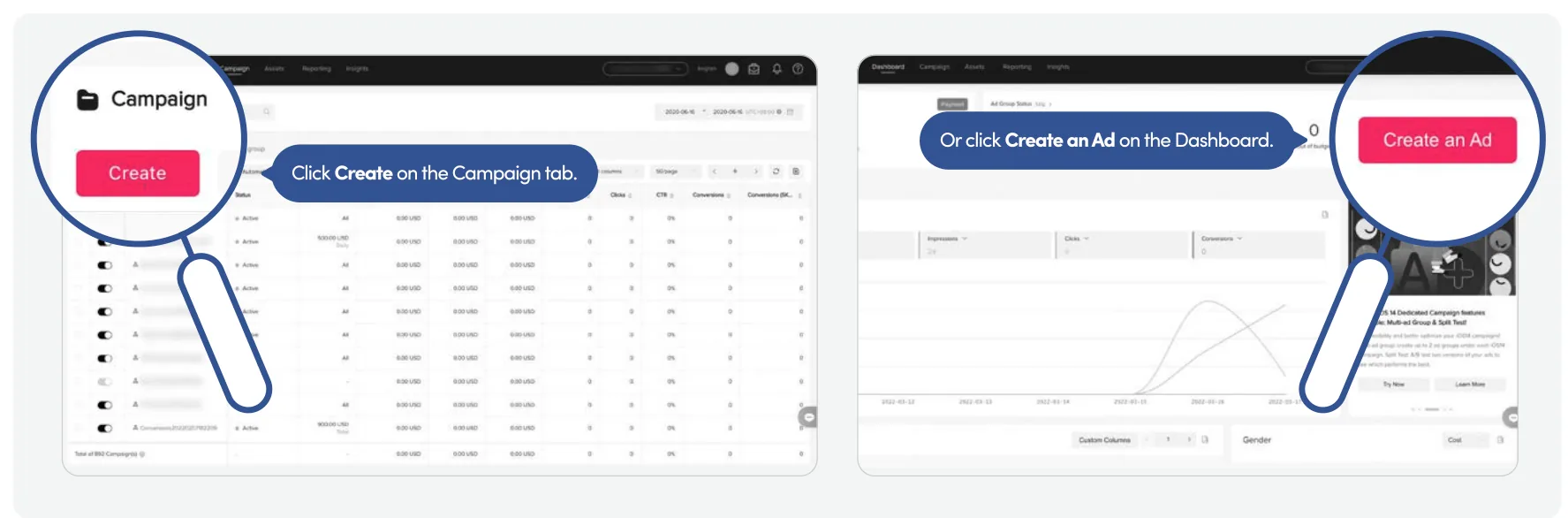
Ad group: set the landing page or app, placements, audience, region, budget, delivery dates, and bidding. Ad: choose the identity, upload suitable images/video, fill in the text, button, and destination URL, and check the preview. When using Spark Ads, obtain the corresponding account or content authorization.
Set the amount according to the minimum budget shown on the page. If the objective is conversions, configure the corresponding event tracking first; check that the site is accessible, displays correctly on mobile, and that the content matches what the ad promises.
Step 3: Fill in payment info, matching your PIKABAO card
We'll assume you already have a PIKABAO virtual card. Below, the left shows the payment fields, and the right shows a PIKABAO VISA card face example — the example details must not be used for actual payments; fill in from your own card:
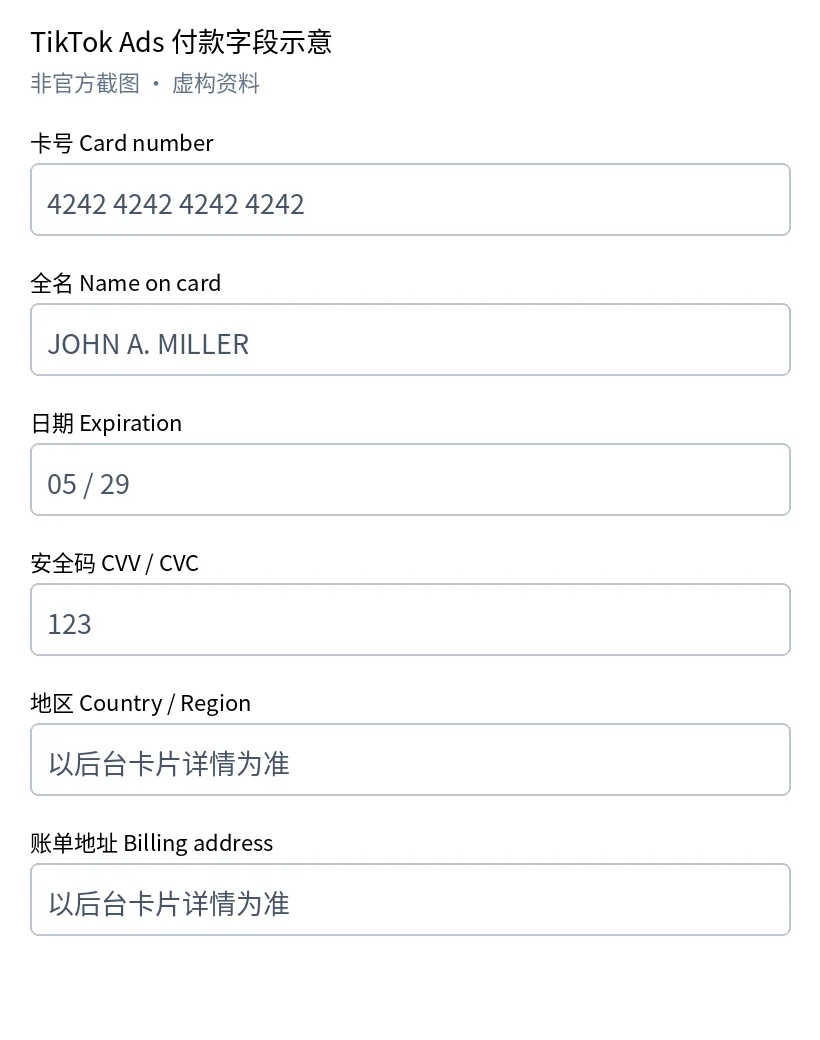 Illustration of the payment fields (not an official screenshot, fictional details), used to show how the fields map; the actual form depends on your account.
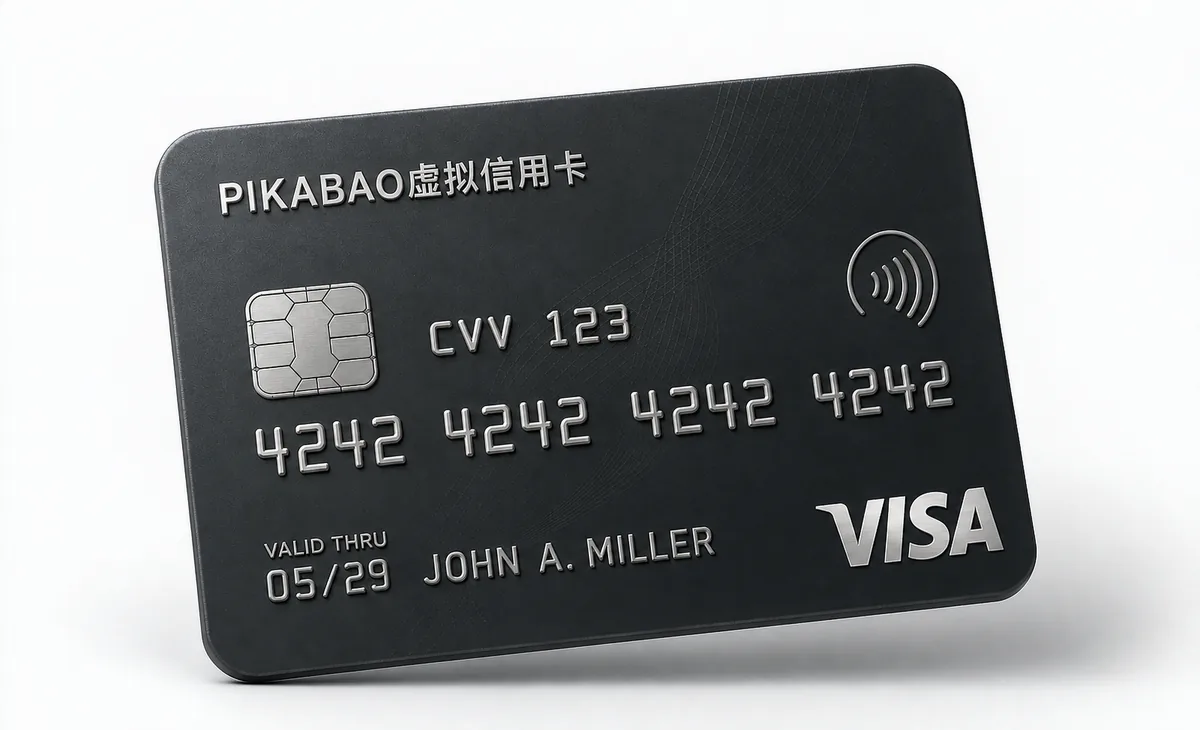 VISA-style card face sample; all card details are fictional.
Match each field: Card number — enter the full card number; Full name — enter the name registered on the card; Date — enter the expiry date as MM/YY; CVV/CVC — enter the three-digit security code (what's often called the "VCC number" is usually labeled CVV/CVC on payment forms).
Region and billing address: open the "Card details" in the PIKABAO dashboard and use the registered card details; how to get them is covered in Where to find the card number, expiry date, and CVV and Where does the billing address come from. The ad account's business address, entity name, and tax details are separate — fill those in with your real entity. If the platform doesn't show a field, there's no need to add anything extra.
Confirm the card supports the platform, currency, online transactions, and charge method, and keep enough usable balance. Click Save / Submit; if verification appears, complete it per the issuer's prompts. Whether a virtual card is accepted is decided by the platform and the issuer.
Step 4: Add the card and choose a payment mode that actually works
Manual payment: add a balance first; ad spend is deducted from the balance, and delivery stops when the balance runs out. Automatic payment: charges happen when spend reaches the payment threshold or on the billing date. The available methods depend on your account; an automatic-payment account can't be switched straight back to manual payment.
Step 5: Top up or complete verification, and submit the ad for review
Manual-payment accounts: Tools → Settings → Billing → Payment → Add balance; choose a method the page supports and top up. Accounts managed by Business Center should manage their balance from Payment management in Business Center.
Automatic-payment accounts: complete card verification and confirm the primary payment method is valid. If the page doesn't support the card or method, use a payment method the platform actually supports — don't enter a prepaid card as if it were a credit card.
Finally, review the creative, destination link, region, budget, and schedule, then click Submit. After both account review and ad review pass, also confirm the ad is enabled, the schedule has started, the payment is valid, and the balance is sufficient. Look at impressions or clicks to confirm delivery actually started.
Step 6: Confirm account status and save payment receipts
Ad status: in Campaign, check the campaign, ad group, and ad separately. Payment records: view transactions and charges in Billing / Payment. Invoices for Business Center: Finance → Invoices, filter by advertiser, date, or payment status, then view and download available invoices; you can also export PDF / Excel as shown on the page.
Keep the platform's transaction records / invoices alongside your PIKABAO transaction details, and compare the amount, currency, merchant, date, and card last four digits. Check verification charges and ad spend separately — a successful verification doesn't mean the ad has started delivering.
Manual/Automatic Payments and Card Type
Automatic-payment card types
TikTok’s automatic-payment rules exclude prepaid cards. “Virtual” describes form, not that every virtual card is prepaid. Check actual card attributes and account rules; do not enter a prepaid card as a credit card.
Manual mode and switching
Manual payment adds ad balance in advance, but is not available to every account or guaranteed to accept a card. Official guidance says automatic payment cannot be switched directly back to manual payment; check current account rules first.
Current official rules
Source: TikTok automatic-payment setup. Historical manual screenshots illustrate interfaces; current account and official rules take precedence.
Mode names do not establish card attributes
Virtual, prepaid, debit and credit describe different dimensions. Use the actual attributes and account rules; Visa or Mastercard branding alone does not establish automatic-payment eligibility.
Balance funding does not establish free switching
Mode availability can depend on region, currency and eligibility. Check the displayed entry and official switching rules before choosing a method; do not repeatedly create accounts to find manual payment.
Advertising Use, Acceptance and Slots
Advertising use
Choose a currently supported advertising use and check MCC 7311. Pikabao’s category support follows current issuance options, but it does not satisfy every merchant account review, card-type, billing-mode or authentication requirement. Business location and tax details must remain truthful.
Specific acceptance
Check the network, card type, issuing region, merchant category, billing mode and authentication support together. Acceptance is decided by the merchant and issuer. Correct addresses, supported advertising categories or one successful payment do not guarantee another payment.
Advertising slots
Standard users can hold up to 5 unclosed cards. Approved advertising users can hold up to 30 after application, not automatically for every team account. Frozen, idle and inactive cards count until closure completes. Idle cards are not automatically closed.
Project allocation
Allocate cards by project, purpose or billing cycle to reconcile bills, distribute funds and manage cards individually. One card per merchant is not mandatory. Separate cards or BINs do not guarantee risk isolation, account independence or higher acceptance. Set budgets and spending caps with the merchant; card funds and read-only limits are not advertising budgets.
Payment Status, Failures and Retries
Review the original transaction
For a payment issue, check the order, receipt, authorization and final charge status to avoid double payment. Use the message to check available funds, read-only limits, card status, registered details, acceptance and authentication. No transaction record is only a clue: it does not prove merchant blocking, that the issuer received nothing or that another card cannot help.
Retry after correction
Retry according to the merchant’s instructions after identifying and correcting the cause. If the status is unclear, contact support instead of repeatedly submitting or issuing test cards. There is no universally safe retry count. Most segments do not charge for declines; charging segments allow 3 free failures per calendar month, then charge $0.40 each from account balance, resetting at the start of the UTC month. Check current segment terms.
Query the appropriate support
Provide the merchant, time, amount, currency, card’s last digits, transaction ID and a redacted screenshot when contacting support. Never send the full card number, CVV, password, verification code or seed phrase. Contact the merchant for order issues and Pikabao support for card or deposit status.
If ads do not deliver after funding, check actual ad balance, review state, schedule and budget. A card authorization does not establish credited ad balance; credited balance does not establish creative approval. Investigate each stage rather than making repeated test top-ups.
Verification Charges, Refunds and Returned Funds
Automatic-payment verification
TikTok’s automatic-payment setup says verification deducts at least US$10 or local equivalent and refunds it within 15 days. Distinguish charges, authorizations and refunds in actual records; do not equate this amount universally with a $0/$1 hold. Retain records and contact TikTok if not returned as described.
Merchant refunds and platform returns
The merchant initiates refunds under its rules. Check the destination and status against the original transaction; arrival is not guaranteed within a fixed time. Returning card funds to account balance, withdrawing account balance to a wallet and merchant refunds are separate operations. The $3 per account-balance withdrawal is not a fee for every merchant refund. Review pending authorizations, disputes and refunds first.
Budgets, Balances and Stopping Ads
Budgets, balances and limits
Manage advertising budgets, billing thresholds, ad-account balances, card funds and read-only limits separately. Budgets govern delivery, thresholds trigger billing and ad-account balances serve applicable prepaid modes. Fund the card for actual bills and funding intervals; funding does not raise limits.
Stop future delivery
Pause or close ads to stop future delivery and check incurred but unsettled fees. Deleting, freezing or closing a card does not cancel those fees. Reconcile ad spend, verification records and final charges separately.
Review incurred amounts due
Insufficient manual-payment balance can interrupt delivery but does not prove there are no unpaid or historical fees. Reconcile ad spend, payments and unsettled amounts to determine amounts due.
FAQ
Is TikTok Ads payment guaranteed with a virtual card?
Check the network, card type, issuing region, merchant category, billing mode and authentication support together. Acceptance is decided by the merchant and issuer. Correct addresses, supported advertising categories or one successful payment do not guarantee another payment.
Does excluding prepaid cards exclude all virtual cards?
No. Virtual is form; prepaid is a funding attribute. Check actual type and current account acceptance. Manual payment does not guarantee every card is accepted either.
How should I check a US$10 verification?
TikTok states automatic-payment verification deducts at least US$10 or equivalent and refunds it within 15 days. Distinguish holds, charges and refunds; contact official support if overdue.
Does an empty balance erase historical fees?
Pause or close ads to stop future delivery and check incurred but unsettled fees. Deleting, freezing or closing a card does not cancel those fees. Reconcile ad spend, verification records and final charges separately.
What should I check when choosing an ad card?
Check the network, card type, issuing region, merchant category, billing mode and authentication support together. Acceptance is decided by the merchant and issuer. Correct addresses, supported advertising categories or one successful payment do not guarantee another payment.
What authorization is needed for Spark Ads?
Obtain the required account or content authorization and follow official steps. Do not use unauthorized content. Successful card payment does not establish content or account approval.
What should I do after payment fails?
For a payment issue, check the order, receipt, authorization and final charge status to avoid double payment. Use the message to check available funds, read-only limits, card status, registered details, acceptance and authentication. No transaction record is only a clue: it does not prove merchant blocking, that the issuer received nothing or that another card cannot help.
Are ad-balance refunds the same as account withdrawals?
The merchant initiates refunds under its rules. Check the destination and status against the original transaction; arrival is not guaranteed within a fixed time. Returning card funds to account balance, withdrawing account balance to a wallet and merchant refunds are separate operations. The $3 per account-balance withdrawal is not a fee for every merchant refund. Review pending authorizations, disputes and refunds first.
Where should I stop ad spending?
Pause or close ads to stop future delivery and check incurred but unsettled fees. Deleting, freezing or closing a card does not cancel those fees. Reconcile ad spend, verification records and final charges separately.
Does a card charge establish credited TikTok ad balance?
Not necessarily. Check the billing mode and whether the record is verification, authorization or balance funding, then confirm the actual ad-account credit. Payment, credited funds, creative review and delivery need separate confirmation. Do not top up again while status is unclear.
Check Uses and Fees Before Issuing a Pikabao Card
Register and complete required checks, review current segments, merchant requirements and actual fees, then fund the intended card for its bills.