
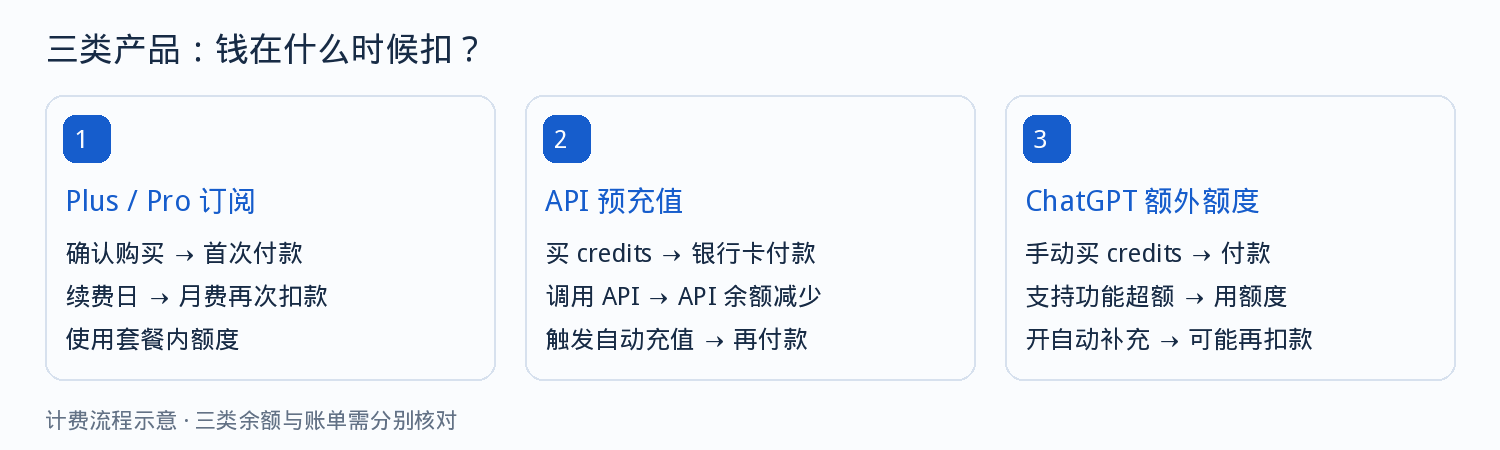
Many people use both a membership and the API at the same time, and when the bills are mixed together it's hard to tell which charge is which. Looking at the three channels separately makes the problem much simpler.
Three billing channels, explained
| Channel | What you get | When the card is charged |
|---|---|---|
| Plus / Pro membership | A personal ChatGPT membership; in-plan usage is consumed per the rules | On first purchase and on each monthly renewal |
| API balance | API call quota, deducted by actual usage | When purchasing balance, and when auto top-up triggers |
| Extra credits | Additional usage for supported features | When purchasing, or replenished automatically per the rules |
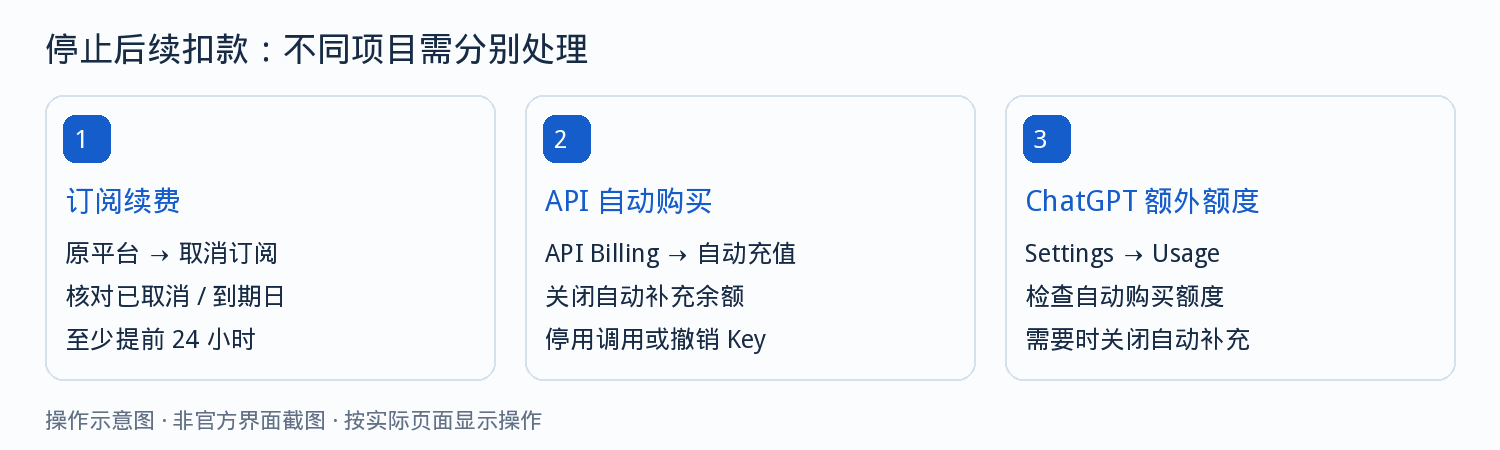
The three channels are charged separately. Cancelling one does not close the other two.
Plus vs Pro: how to choose
Both are personal memberships; the difference is in the tier and the usage caps. Choose based on your actual daily usage intensity, not the price.
| Comparison | Plus | Pro |
|---|---|---|
| Official base price | $20 / month | $100, $200, $500 / month, multiple tiers |
| Best suited for | Daily writing, Q&A and file analysis | Long sessions of heavy use |
| Billed by usage | No, in-plan usage is consumed per the rules | No, consumed according to the selected tier |
| Includes API | No | No |
| Charged if unused for a long time | Still renews if not cancelled | Still renews if not cancelled |
The USD prices are the official base prices. Region, currency and taxes make the actual amount differ; the checkout page is the source of truth.
When you're developing websites, bots or batch data processing, you use the API, not the membership. Membership quota cannot be used directly as API balance.
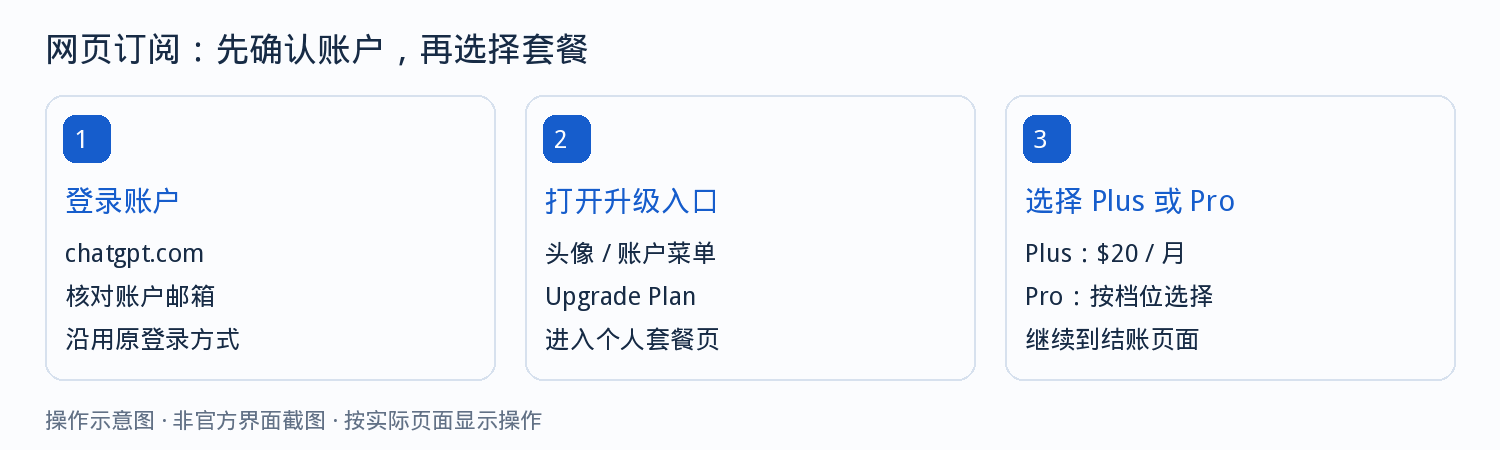
Web subscription: six steps
- Open the official ChatGPT website and sign in to the target account, using your usual sign-in method.
- In account settings, check the current plan and confirm that no subscription is active.
- Enter the upgrade entry and choose a plan; upgrading from the free plan to Pro must be done on the web.
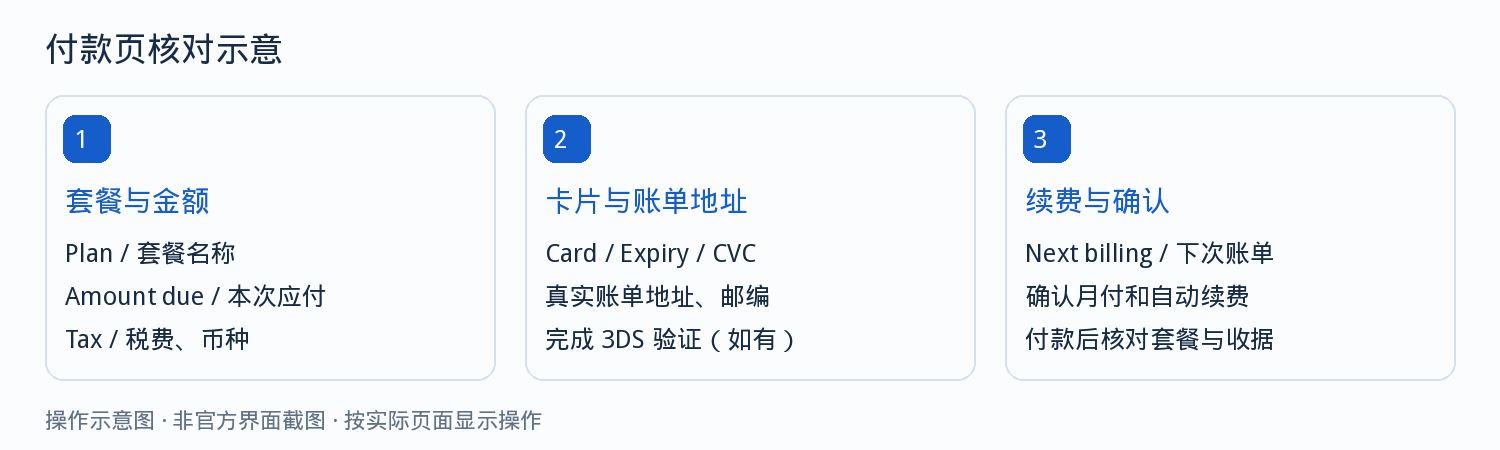
- Fill in the card number, expiry date, security code, plus your name and real billing details.
- Before paying, note down the plan name, currency, the amount due this time, the period, and the next billing date.
- After paying, go back to the account, confirm the plan has changed, and save the receipt.
Bank verification may appear during payment. Complete it as prompted on the page, and don't refresh or close the payment page midway.
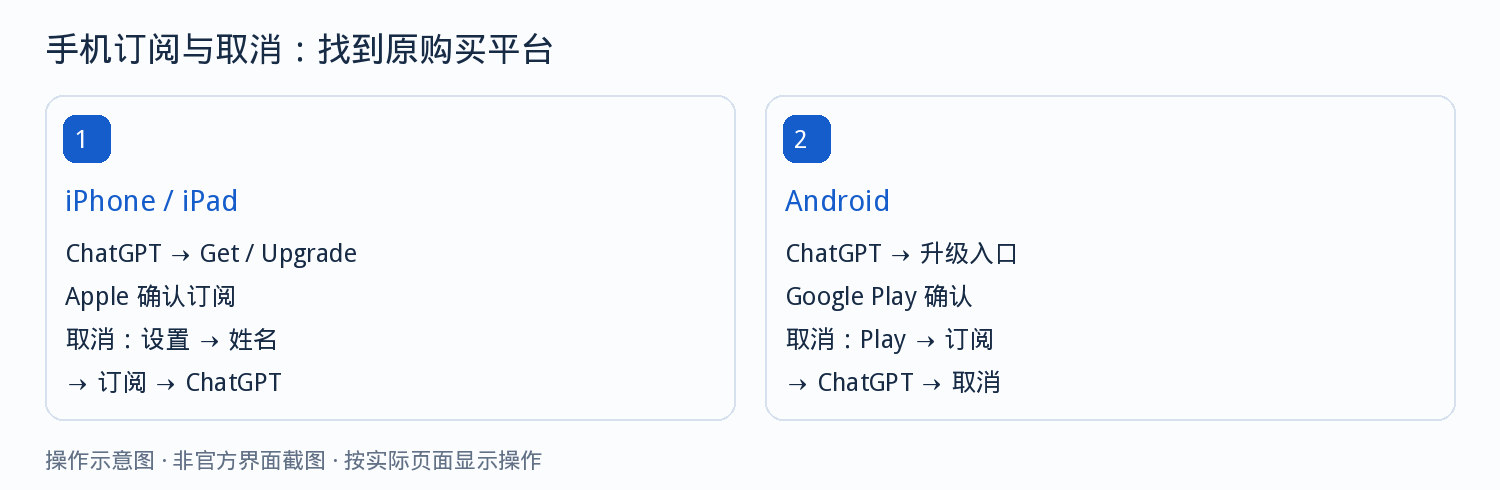
Mobile subscription: Apple and Google Play
When you subscribe on your phone, the party that charges you is the app store, not OpenAI. The price and currency follow the store's confirmation page.
- iPhone and iPad: use the official app and verify the item, price and period on the system's subscriptions page.
- Android: use the official app and verify the store account and currency on the Google Play confirmation page.
- If you already bought a membership on the web, you don't need to pay again on mobile — just sign in with the same account.
Four checkpoints for API sign-up and top-up
The API and the membership are two separate entries. Before signing up, confirm the current organization; if the wrong organization is selected on the billing page, the payment will land on another organization.
- Enter the API platform and confirm the organization name and billing ownership on the billing page.
- Add a payment method and choose an initial top-up amount; a new account is usually topped up before use.
- Check the auto top-up toggle. It's on by default; turn it off before confirming if you don't need it.
- After the purchase, create an API key and check actual consumption on the usage page.
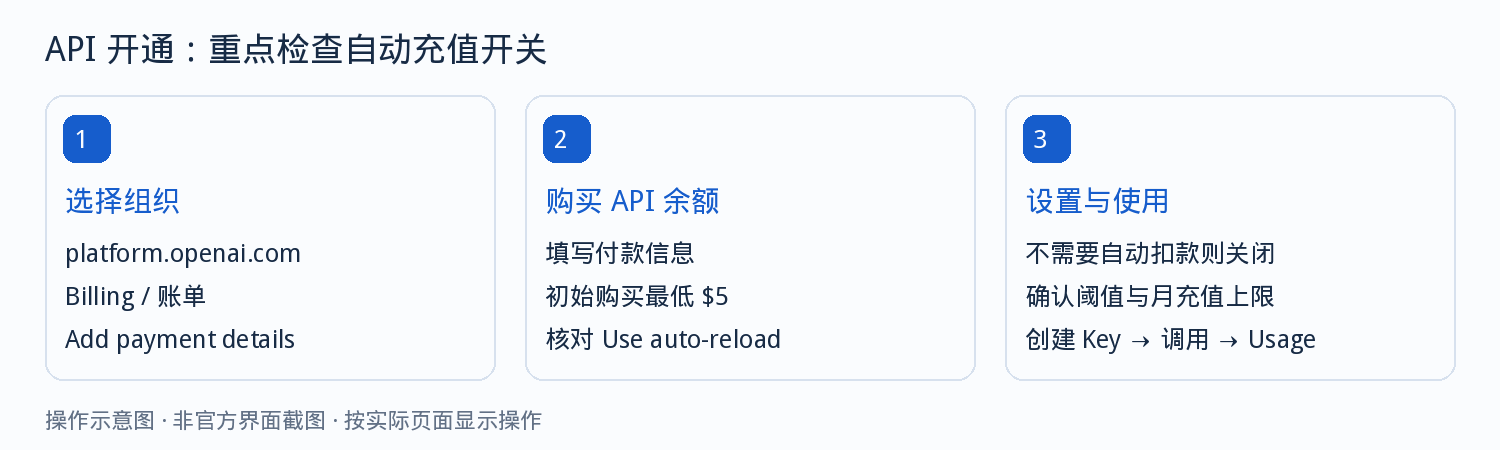
How API billing works: two actions viewed separately
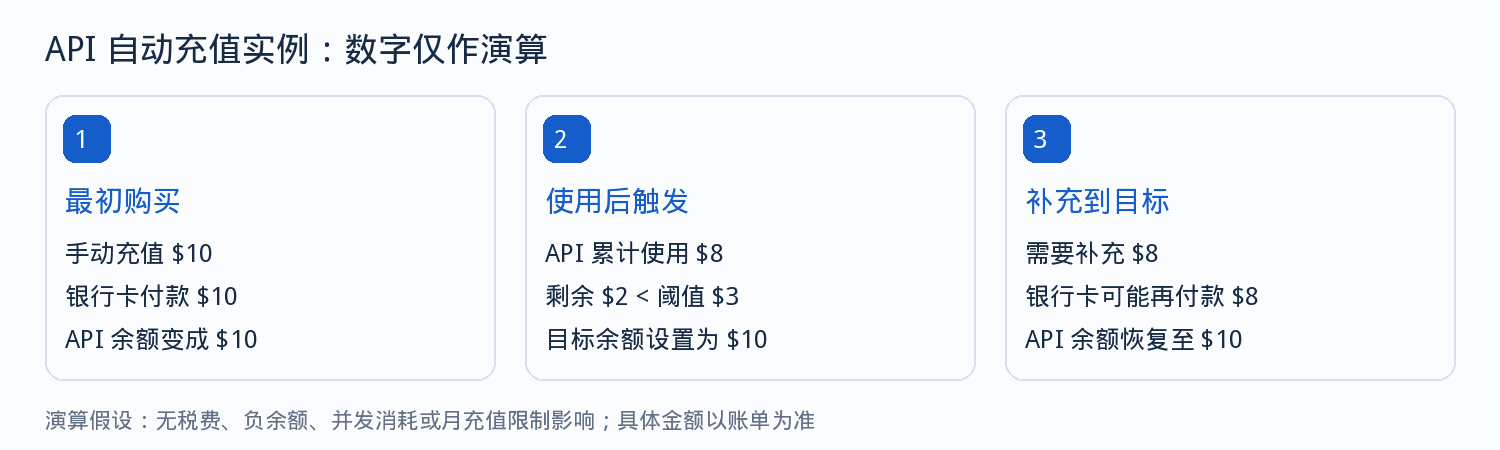
The bank card is charged when you purchase balance. API calls deduct from your balance and usually don't charge the card for every single request.
| Action | Result |
|---|---|
| Purchase balance | The card pays once; API balance increases |
| Call the API | Balance decreases, priced by input and output usage |
| Auto top-up triggers | The card pays again; balance returns to the set level |
Usage records are not new card charges, so keep the two separate.
The monthly cap on auto top-up only limits automatic purchases; it doesn't limit manual purchases, and it doesn't limit using the balance you already have. If you need to stop further spending, turn off auto top-up, stop making calls, and revoke keys you no longer use.
Renewal, cancellation and refunds
Monthly subscriptions renew every month on the purchase date. Buy on October 6, and you're usually charged again on November 6.
| Purchase channel | Where to cancel |
|---|---|
| Web | Billing page in account settings |
| Apple | Subscriptions management in system settings |
| Google Play | Payments & subscriptions page in the store |
Cancellation and refunds are two different actions. After cancelling, you can usually keep using the plan until the end of the current period; cancelling doesn't mean this month's fee is refunded. Whether a refund is granted depends on the purchase channel and the applicable rules.
How to investigate abnormal charges
| What you see | How to handle it |
|---|---|
| Payment succeeded but still shows the free plan | Check the account email and sign-in method used for the purchase |
| Multiple charges within one month | Check the membership fee, extra credits and API top-up separately |
| Card declined | Check balance, card details, billing address and whether the region matches |
| Still charged after cancelling | Confirm whether the cancellation was made before the renewal date |
| Platform balance shows a negative number | Handling after the balance runs out is delayed; check the usage records first |
The troubleshooting order is fixed: first confirm which channel the charge landed on, then check that channel's billing status.
When contacting support, prepare the account email, purchase channel, transaction date, currency and amount, order number, and the last four digits of the card. Never send the full card number, security code or verification code.
Four extra things virtual card users should verify
- Whether the issuing provider supports this merchant and international online payments.
- Whether the card's billing address is in the same region as the account's region.
- Whether the card balance covers this amount plus any possible authorization holds.
- Whether subscription-type recurring charges are supported; a first success doesn't guarantee that later renewals will succeed.
Choosing cards by subscription scenario costs less than repeatedly testing cards
Subscription payments hinge on three things: whether the card network is accepted by the merchant, whether the billing-address region matches the account, and whether recurring auto-charge is supported. The five entries below are ordered by decision sequence.
Card type selection guide
Compare card types by payment requirementsMatches card types against 5 user profiles and 15 use cases, and explains how BIN ranges work and how to combine multiple cards.
Visa virtual card
When the merchant accepts Visa, or the merchant's preference is unknownThe widest acceptance, good for subscriptions and advertising scenarios, and a solid first run-through of a complete payment.
Mastercard virtual card
Card binding and verification, monthly auto-renewalsMore stable compatibility for card-information verification and recurring auto-charge scenarios.
US virtual card
When the account region is the US and a US billing address is requiredA US BIN paired with a US billing address resolves declines caused by an address mismatch.
Hong Kong virtual card
When the account region is Hong Kong, China and a Hong Kong billing address is requiredA Hong Kong BIN paired with a Hong Kong billing address, used on the same principle.
Switching cards incurs a new issuing fee (from $1, priced by card range). Confirm your account region first, then decide which card family to open.
Frequently asked questions
What's the difference between ChatGPT Plus and Pro?
Both are personal memberships; the difference is in the tier and the usage caps. Use Plus for daily writing and file analysis; consider Pro only for long sessions of heavy use. The exact tiers and prices follow the checkout page.
Do I still need to buy the API separately if I have a membership?
Yes. The membership and the API are two separate billing channels, each bound to its own payment method. Buying a membership doesn't give you API balance, and topping up the API doesn't activate a membership.
What if I want to switch to a different card after subscribing?
Update the payment method on the billing page of the original purchase channel. Updating the card is not the same as cancelling the subscription; renewals will still continue.
How long can I keep using it after cancelling?
Usually until the end of the current paid period. The cancellation itself doesn't refund fees already paid.
Why is there a small charge when I bind a card?
It's a pre-authorization the merchant uses to verify the card is valid. It's usually released automatically after a period of time, and temporarily holds card balance until then.
Can I use a virtual card to subscribe to ChatGPT?
It depends on whether the issuing provider supports this merchant and subscription-type charges. We recommend a card whose billing address matches the account's region, and confirm that the card balance covers the first period's amount before trying.
Get your card first, then come back to subscribe
Subscribing itself isn't complicated; where people get stuck is usually the card side: a region mismatch, insufficient balance, or no support for subscription-type charges. Get the card ready first, then follow the steps above.