
Step 1: Confirm your service region and complete registration
Open binance.com (external source, for verification only, not an endorsement), click Sign up, and follow the page to register with your email or phone number, set a password, and confirm the verification code and terms of service. Don't install apps from links in unfamiliar text messages or private chats.
Go to Verify identity and submit your own ID, a selfie or live check, and the required proof of residential address as prompted. After that, enable two-factor verification or a passkey and keep your recovery method safe. Passing review doesn't mean every coin, payment or withdrawal feature is available.
Step 2: Before buying, confirm what PIKABAO accepts
Log in to the dapikabao.com console (your PIKABAO account dashboard), and open the account top-up entry: first confirm which coins, networks, minimum top-up amounts, order validity periods and fees are currently supported, then decide how much to buy. Bot and web accounts may use different balances and top-up entries; don't mix them up.
Step 3: Buying USDT via P2P and paying
Go to Trade → P2P → Buy, choose the fiat currency your account allows and USDT, and filter sellers by payment method. WeChat Pay / Alipay can only be used when your own account, local rules and that particular order all allow it and it actually shows up; they aren't a direct top-up method offered uniformly by the exchange. When no such option is available, use your own bank-based payment method that is supported locally.
On Binance P2P, sort by completion rate and order limit before price: the cheapest listing is often the one with the lowest limit or a new-buyer restriction. Screenshot the recipient name and account shown inside the order, and ignore any account number sent in chat.
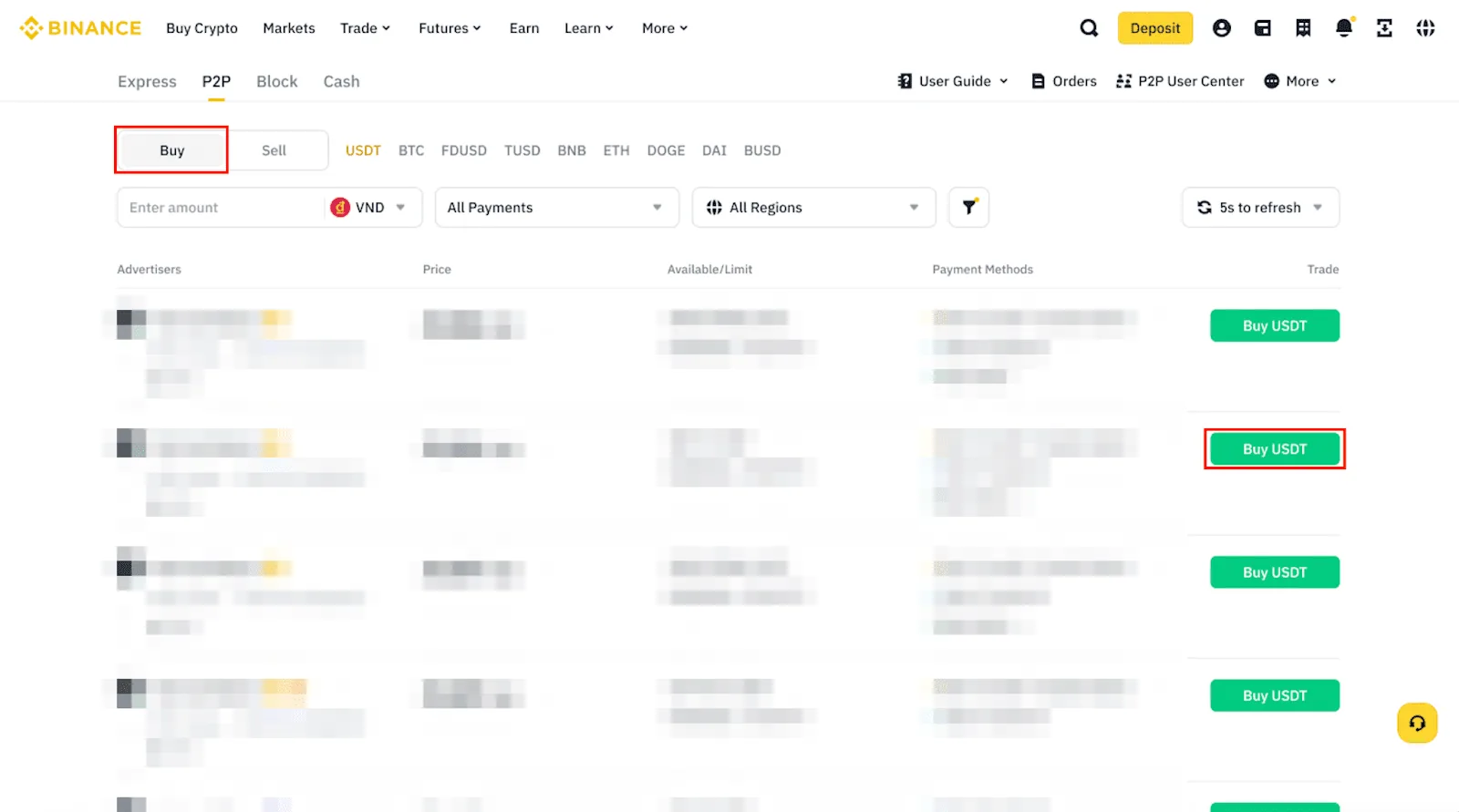
Payment steps for WeChat Pay or Alipay orders
Binance P2P supports WeChat Pay, Alipay and bank transfer, but only when that order and that seller allow it. Pay from your own verified account, leave the remark blank rather than naming the coin, then click Paid and wait for release.
Keep the order page open while waiting. If you paid but the coins are not released within the time limit, file an appeal inside the order; cancelling breaks the evidence chain. Refuse any request to pay a different account found in chat.
Step 4: Get your PIKABAO top-up address and check the network
Create an order on the top-up page to get a dedicated address. Keep the coin on USDT and the network identical to the one selected on Binance's withdrawal page. The address stays valid, so there is no need to regenerate it each time. A card number, an email address or a user ID is not an on-chain address.
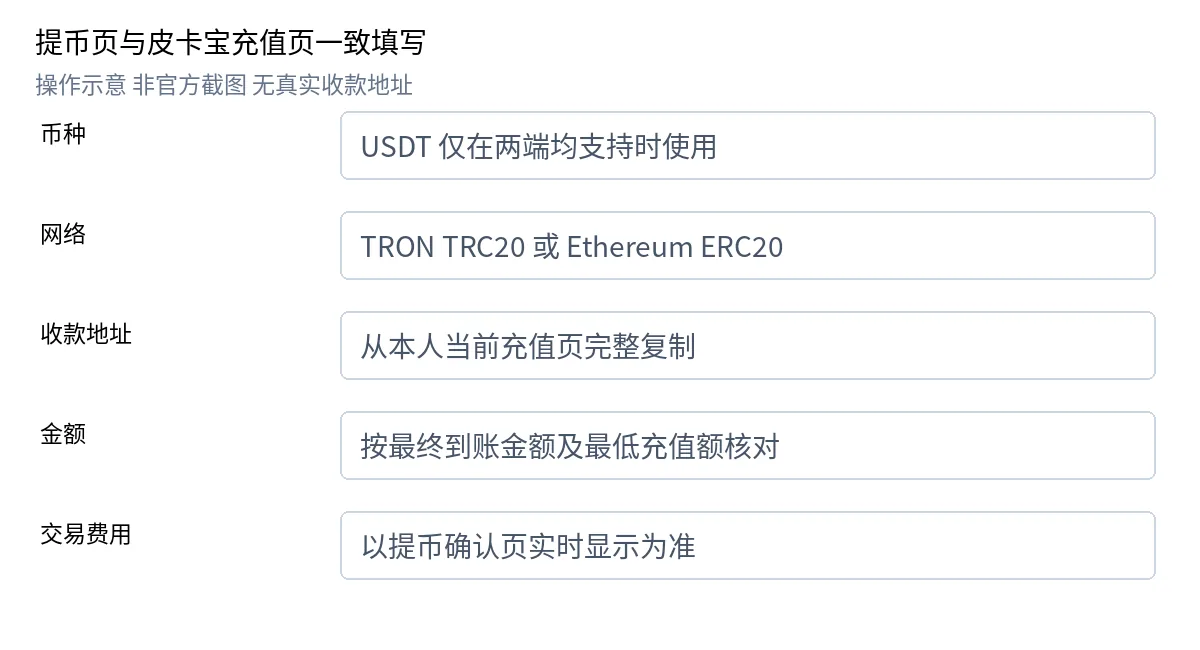
Step 5: Withdraw on-chain from Binance
Path: App: Assets → Overview → Send → Withdraw Asset / Web: Assets → Overview → Withdraw → Withdraw Asset.
Select the coin and the available account, paste the address, confirm the network and enter the amount. If the balance used for buying differs from the account used for withdrawing, transfer between the funding and trading accounts internally as the page prompts.
Do a final check before submitting:
| Check item | What to go by |
|---|---|
| Full address | Copy it completely from PIKABAO's current top-up page, not from old records or addresses in chats |
| Coin and network | Must match the top-up page character for character (USDT + TRC20 or USDT + ERC20) |
| Fee and credited amount | Go by what the withdrawal confirmation page shows in real time, and check the minimum against the credited amount |
| Memo/Tag | Fill it in whenever the top-up page requires it; if it's missing, the deposit may not be auto-credited |
Official withdrawal instructions: Binance · On-chain withdrawal help (external source, for verification only, not an endorsement).
Once the minimum top-up is met, confirm and verify as the platform requires; your first verification transaction must also meet the minimum top-up. Don't send test amounts below the minimum, and don't pay late or split time-limited orders on your own.
Step 6: Confirm the funds arrive and move them onto your virtual card
Binance shows Processing first, then Completed once broadcast. Completed only means Binance sent it — whether PIKABAO credited the account is a separate record. Copy the TxID from the withdrawal detail page before you close it.
Check the credited amount in the top-up record (already net of the on-chain fee), then open card management and use Transfer in to move account balance onto the card. Budget and shared-balance cards follow their own product rules and may not show a separate top-up button.
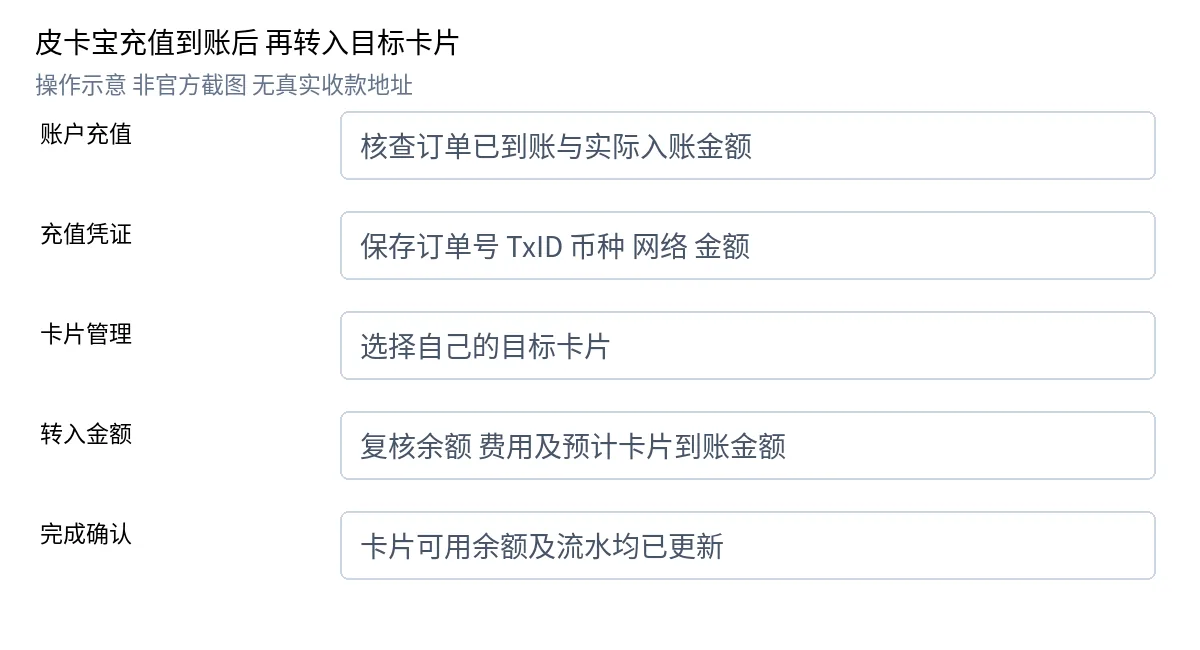
Verify three things: the account balance fell by the transferred amount, the card's available balance rose at the current rate, and a transfer record exists. USDT cannot be sent to a card number, and receiving USDT does not raise the card balance on its own — the transfer step is mandatory.
How to check when funds haven't arrived
| Situation | What to do first |
|---|---|
| The exchange is still processing | Check the platform notices and withdrawal limits, and wait for processing to finish |
| Broadcast on-chain but not credited | Verify the coin, network, address, amount, minimum, order validity and confirmations, and give PIKABAO support your order number and TxID |
| Card balance hasn't increased | Check the account credit record and the card transfer result, and confirm whether the "transfer in" step was done |
Don't resend, and never share a password, code or recovery phrase with anyone claiming to be support. Escalate with the order number and TxID instead.
How to pick the network: the difference between TRC20 and ERC20
PIKABAO only receives USDT, on just TRC20 / ERC20 two chains: TRC20 usually arrives within 1–5 minutes and ERC20 within 2–10 minutes, the per-transfer minimum is 20 USDT (judged by the credited amount), the account top-up fee is $0, and dedicated addresses stay valid long term. Both chains work; the main trade-offs are arrival time and the withdrawal fee: go by what the withdrawal confirmation page shows in real time — just because "either would work" doesn't mean you pick at random, whatever you choose must match on both sides. See Which deposit methods are supported and How long does a deposit take.
After the funds arrive: topping up the card is a separate step
Account balance ≠ card balance. Once the money is in your account, you also need to run the "transfer in" action in card management, which charges a flat 3% card top-up fee; the card issuing fee is from $1 with no monthly fee. "Adding money to the account" and "moving the money onto the card" are two actions with two fees; for the full list see What's the total cost of a card and How are top-up fees calculated.
Card balance is a one-time total pool: it isn't reset monthly and doesn't refill itself; the amount you can actually spend is "card balance − pending authorizations". See What does card limit mean.
A one-line checklist
Asked "how do I top up PIKABAO with USDT bought on Binance", remember three boxes: first confirm the policy (coin / network / minimum), then confirm both sides match, and keep your records (order number + TxID). "Completed" on the exchange doesn't mean credited; if funds haven't arrived, verify first and then contact support; never pay twice.
Frequently asked questions
Can I buy USDT on Binance directly with RMB?
It depends on the fiat currencies and payment methods open in your account's region: P2P goes by what sellers actually support, and WeChat Pay / Alipay can only be used when your own account, local rules and that particular order all allow it and it actually shows up — they aren't a direct top-up method offered by the exchange.
Does PIKABAO accept coins other than USDT?
USDT only, over TRC20 or ERC20. Buying USDC or BTC on Binance and withdrawing it will not credit your account — a wrong-coin transfer needs a manual ticket to recover.
TRC20 or ERC20: which chain should I choose?
Both work. TRC20 is cheaper and credits in about 1–5 minutes; ERC20 costs whatever the network charges at the time and credits within 2–10 minutes. Pick by amount — small sums favour TRC20, larger ones favour ERC20's wider support — then match the network on both screens.
What is the minimum top-up? What happens below it?
20 USDT per transfer, judged by the credited amount. Transfers below the minimum (including test amounts) may not be credited, so don't send them; go by the credited amount shown on the withdrawal confirmation page after the fee is deducted.
The exchange says Completed but PIKABAO hasn't credited me — what now?
"Completed" refers to Binance's withdrawal order, not PIKABAO's credit. Check the top-up record; after 30 minutes with nothing there, look up the confirmation count with the TxID, then contact support. Never resend.
Does an address starting with 0x always mean ERC20?
No. Address formats can be identical across chains; the network can only be confirmed by what both sides' pages show, never inferred from the address format. An address on another network that also starts with 0x can't be used as Ethereum.
Do I need to fill in a Memo/Tag?
PIKABAO issues standard USDT addresses that normally need no Memo/Tag. If the page shows the field, fill it — a transfer to a tagged address without the tag will not credit automatically.
I paid on P2P but the seller won't release the coins — what now?
Don't cancel the order; file an appeal on the platform and provide proof of payment. If you see suspicious receiving details, stop paying first. Don't try to resolve it privately outside the platform, and don't transfer money to strangers.
Why hasn't my card balance gone up after the funds arrived?
Account balance and card balance are two layers: after the money reaches your account you still need to run the "transfer in" action in card management, which charges a flat 3% card top-up fee. After transferring, check the card's available balance and the transfer records.
Basis and maintenance
The illustrated steps cover "buying USDT on Binance and topping up PIKABAO". The text and figures correspond to the 2026-10-12 version of the illustrated Binance guide (all details in the illustrations are fictional examples and must not be used for real payments). The factual policy in the second half is condensed from the current wording on the site's product and FAQ pages, and the rates follow the current policy: account top-up $0, flat 3% card top-up, issuing fee from $1.
Binance's account opening, verification, P2P and withdrawal rules follow its current official documentation: P2P buying (external source, for verification only, not an endorsement), On-chain withdrawal (external source, for verification only, not an endorsement), About Binance.US (external source, for verification only, not an endorsement), Regulatory reference · People's Bank of China announcement (external source, for verification only, not an endorsement). Platform rules may change at any time; always follow the current official wording.
Bought your USDT? Issue a card and give it a try
The issuing fee and all rates are listed item by item on the pricing page; the issuing page will show this exact charge in real time before you submit.