
Step 1: Log in to Runway and find the subscription entry
Open runway.com (external source, for verification only, not an endorsement) — Runway's official site — click Login to sign in, and check the account and the current workspace. Users who already have a project should use their original account and not create a new one.
The subscription entry is at app.runwayml.com/settings/billing (external source, for verification only, not an endorsement); you can also enter from Get Standard or Get Pro under the Individual section of the pricing page.
Path:runway.com → Pricing → Individual → Get Standard / Get Pro.
Step 2: Choose a plan and billing cycle
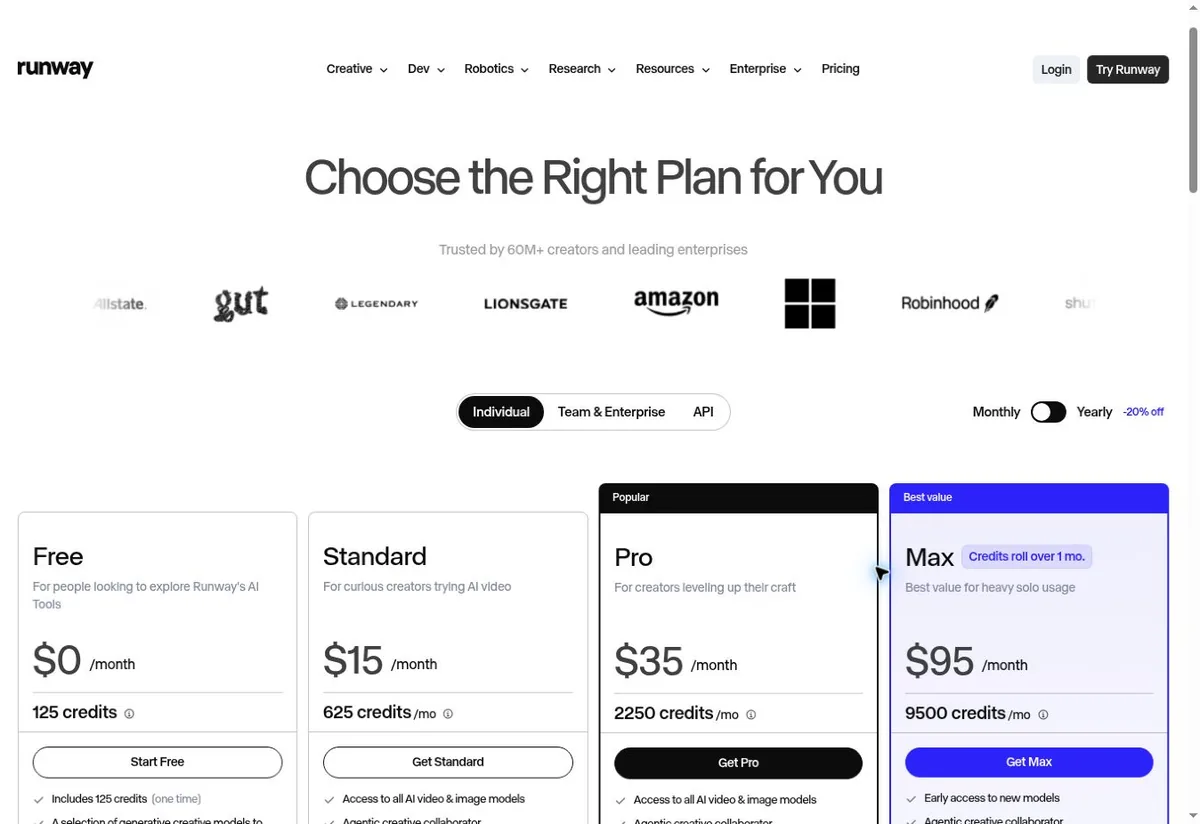
The screenshot shows the Individual monthly prices. The official site may show annual pricing by default — the $12 for Standard, $28 for Pro and $76 for Max are the monthly-equivalent rates of annual billing, not monthly prices; annual billing usually requires paying the full year upfront.
| Plan | Standard monthly | Annual or promo note | Use case |
|---|---|---|---|
| Free | Free | Not applicable | One-time trial credits of 125 |
| Standard | $15 | Monthly-equivalent with annual $12, about $144 per year | 625 credits per month |
| Pro | $35 | Monthly-equivalent with annual $28, about $336 per year | 2,250 credits per month |
| Max | $95 | Monthly-equivalent with annual $76, about $912 per year | 9,500 credits per month |
Annual totals are worked out from the official monthly-equivalent annual rate multiplied by 12; the actual checkout amount and taxes are what the confirmation page shows.
The 125 credits on Free are a one-time allowance; credits on paid plans refresh monthly, and the subscription fee doesn't mean unlimited video generation. Runway's Individual, Team & Enterprise and API are separate product entries; the instructions cover personal web creation subscriptions.
Step 3: Fill in payment details matching the PIKABAO card
Under the individual plan, choose Monthly or Yearly, confirm the plan and the actual total to be charged, then enter the official payment page and fill in the card. The payment form fields map one-to-one to the PIKABAO card face:
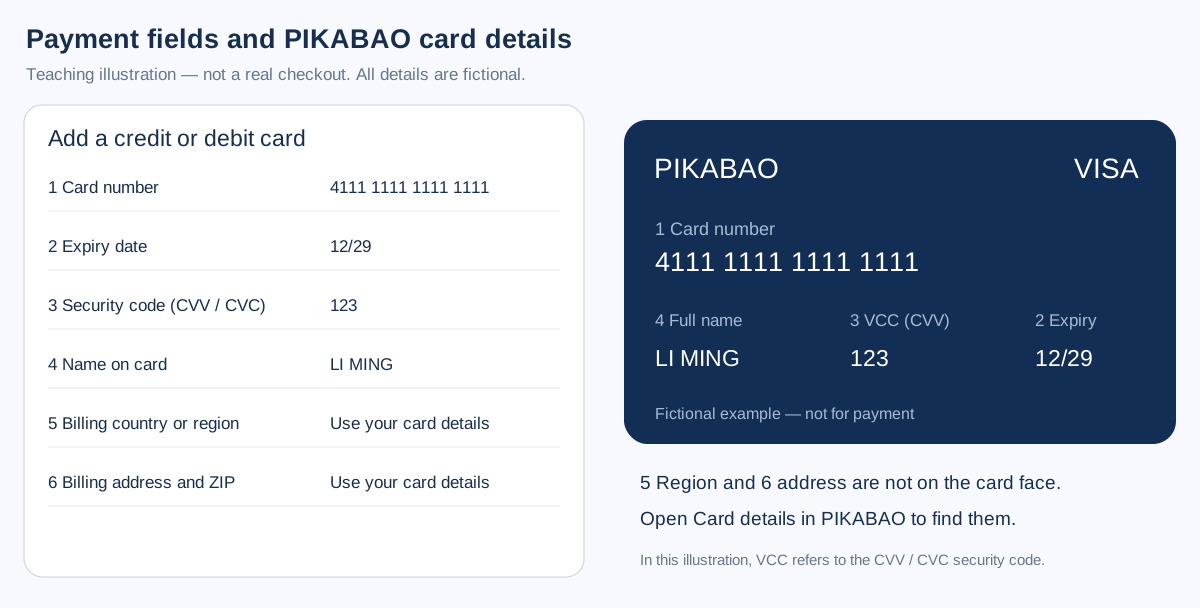
Runway's payment step takes the card number, expiry, CVC and cardholder name on a single screen. Copy each from PIKABAO → Card details and confirm the last four digits first: Runway bills in credits, so a refused payment shows up as a missing credit balance rather than as an error you can act on. See Where to find your card number, expiry and CVV.
Runway asks for a billing country and a postal code and checks both against the card. Take them from PIKABAO → Card details unchanged; a country that does not match the card's issuing region is refused before any credit is added. See Where does the billing address come from.
Choose a PIKABAO card that currently supports this merchant and subscription renewals. Whether a payment goes through depends on the specific card, the bank and the merchant's review; no guarantee extends to every card family, and it doesn't replace the service's account or region eligibility.
Step 4: Pay and confirm the subscription is active
Confirm the billing cycle first: the displayed $12 / $28 / $76 are monthly equivalents of an annual charge, while monthly billing is $15 / $35 / $95. Switch to Monthly before subscribing if you do not want the full year.
Runway payments can trigger 3-D Secure. Complete the verification in the form the card supports and keep the tab open until Runway reports the plan as active; if you close it early, credits are not added even when the card shows a hold.
Return to Billing and confirm the paid plan is active; check the credit balance and refresh date of the current workspace, and confirm it isn't an API account or another workspace.
Step 5: Confirm membership and save payment receipts
Billing → Manage Billing lets you manage payment details and download past invoices / receipts; keep your plan and credit-update records. Official instructions: Runway Help Center · Managing your subscription (external source, for verification only, not an endorsement).
Open the card in PIKABAO and look for a line from RUNWAY. Credits appear on the Runway account once the payment confirms, so a pending card line with no credits means the charge is still an authorization. Read the two together before assuming the plan started.
Save the plan name, order or invoice number, amount actually paid, payment time, next renewal date and the official receipt. When sharing screenshots, cover the full card number, security code, address and personal information.
Stop auto-renewal
Go to app.runwayml.com/settings/billing (external source, for verification only, not an endorsement) → Manage Billing, choose cancel under the current Active plan's management options, complete the confirmation and note the end date.
Deleting your PIKABAO card, running out of balance, uninstalling the software or signing out of the account cannot replace formally cancelling the subscription on the platform. If you bought through an app store, manage renewals in the original purchase channel.
Payment failed or membership not showing: four triage categories
Details rejected: Runway has separate boxes for number, expiry, CVC and cardholder name. Fill them from PIKABAO one box at a time — a CVC typed into the postal-code box, or an authenticator code in the CVC box, is rejected without telling you which field is wrong.
Limit too low: Runway charges the full plan price for the cycle and releases the credits at the same moment. The limit has to cover that price; a card sized for Standard will not survive an upgrade to Pro, which Runway treats as a new charge rather than a top-up.
Charged but no credits: check which Runway workspace the purchase went to — plans attach to the workspace open at checkout. Send Runway support the invoice number and the account email; never send the card's CVC.
Renewal amount changed: check taxes, ended promos, the annual cycle, extra usage, seats or credit purchases. Refunds must be requested per the merchant's policy; cancelling the subscription isn't an automatic refund. An annual subscription and the monthly credit refresh are two different things — buying extra credits is a separate purchase; upgrading, downgrading or switching cycles may produce offsets, which you should verify against the page's order summary.
Don't have a card yet? Open one first: what to prepare
| Step | What to prepare | Fee & time |
|---|---|---|
| Registration | Email + password, activation code | About 30 seconds, free |
| Identity verification | Submit genuine identity details under current first-issuance requirements; configure two-step verification separately | Subject to the actual review status and published terms |
| Two-step verification | Configure Google Authenticator as prompted to protect the account with time-based codes | Separate from identity verification; not a substitute for identity review |
| Top up your account | USDT, only the TRC20 / ERC20 chains | $0 fee; minimum 20 USDT per deposit |
| Open a card | Pick a BIN and initial limit (minimum limit of 20) | Card fee from $1 + 3% service fee on the limit |
To open a card with a limit of 30, the account is actually charged $31.90 (= 30 card limit + 30×3% service fee + $1 card fee), of which the fee genuinely taken is only $1.90 — the remaining 30 is still your spendable limit. The full breakdown of all four fees is at What is the total cost of using a card, and the fee rates are on the site at Pricing.
Definitions and maintenance
The illustrations are precise field diagrams made in-house; no real card-binding interface from a personal account was obtained and no actual payment was made, so the diagrams aren't labeled as official screenshots. Reviewed on 2026-09-30. Plans, prices, buttons and eligibility may change; defer to the actual prompts on your own account's official pages.
The fee definitions follow what's currently in effect on this site: account top-up fee $0, card top-up fee a flat 3%, card fee from $1, minimum 20 USDT per deposit, and a minimum total outlay of $21.6 to open a card with a top-up (minimum card limit of $20 + $1 card fee + $0.60 service fee). Runway's prices and help are per the official statements current at the time; the entries are Runway's official pricing page (external source, for verification only, not an endorsement) and Runway Help Center · Managing your subscription (external source, for verification only, not an endorsement).
Frequently asked questions
Why is Runway's monthly-equivalent annual price different from the monthly price?
The official site shows annual pricing by default: the $12 for Standard, $28 for Pro and $76 for Max are the annual total divided down to a per-month display price, and they require paying the full year upfront; the monthly prices are $15, $35 and $95 for Standard, Pro and Max. If you want to be billed month by month, switch to Monthly before ordering.
Can I keep using the credits on Runway Free forever?
No. The 125 credits on Free are a one-time allowance that ends when used up; credits on paid plans refresh monthly, and the consumption rate varies with the model and duration — the subscription fee doesn't mean unlimited video generation.
What is VCC in Runway's payment fields?
The PIKABAO card face labels the security code as VCC, and in this tutorial VCC means the security code; standard payment fields usually call it CVV / CVC. In other contexts VCC can also mean a virtual credit card — go by the actual fields in your PIKABAO dashboard.
Does Runway require an address when binding the card? What if the card face doesn't show one?
Yes. The billing country or region and the address aren't shown on the card face; open "Card details" in the PIKABAO dashboard, and fill them in split across the payment page's fields; don't make up an address. A mismatch can be blocked by the AVS check.
Runway charged me but membership isn't active — what should I check first?
First verify the signed-in account and current workspace, then check the order status and whether final activation completed. A temporary authorization or pending charge on the card doesn't mean the membership is active — confirm the two separately; if the charge succeeded but nothing was activated, contact official support.
Can I cancel Runway renewal without stopping use?
Yes. After cancelling in Manage Billing at app.runwayml.com/settings/billing, the benefits usually remain until the end of the current cycle; go by the end date shown on your account. Deleting the card or running out of balance can't replace a formal cancellation.
Will Runway refund the difference when I upgrade or downgrade?
Upgrading, downgrading or switching billing cycles may produce offsets; whether any difference is refunded is per the page's order summary and the official policy — and cancelling a subscription doesn't mean an automatic refund.
Is subscribing to Runway with a virtual card reliable?
On a card family that supports this merchant it's a standard scenario: when the BIN's issuing country, the merchant category and the billing address all line up, the subscription payment basically goes through. Insufficient limit on the card on renewal day causes renewal failure — remember to leave room for the tax-inclusive amount.
The amount was higher on renewal day — is the platform overcharging?
Check taxes, ended promos, the annual cycle and extra credit purchases first. The difference isn't a fee collected by the platform; it's tax added to the bill on the merchant side or the regular price resuming after a promo ends.
Open a card and get your Runway subscription running
Opening a card costs from $1 with no monthly fee; top-ups accept USDT only. Standard monthly needs about $16.45 of card balance; the annual plan needs roughly $144 up front.