
ChatGPT Subscription Guide
Sign in to your ChatGPT account, choose a current plan and billing cycle, pay using registered card details and check membership and receipts. Web, Apple and Google subscriptions are managed separately, as is API billing.
Step 1: Sign in to your ChatGPT account
Open chatgpt.com (external source, for verification only, not an endorsement), sign in with your own account and check the account email.
Step 2: Check the prices and pick a subscription plan
Choose the current plan and billing cycle and check the checkout total and tax. The pricing image retains historical content to identify plans and interfaces, not current prices in every region. Use the official checkout total.
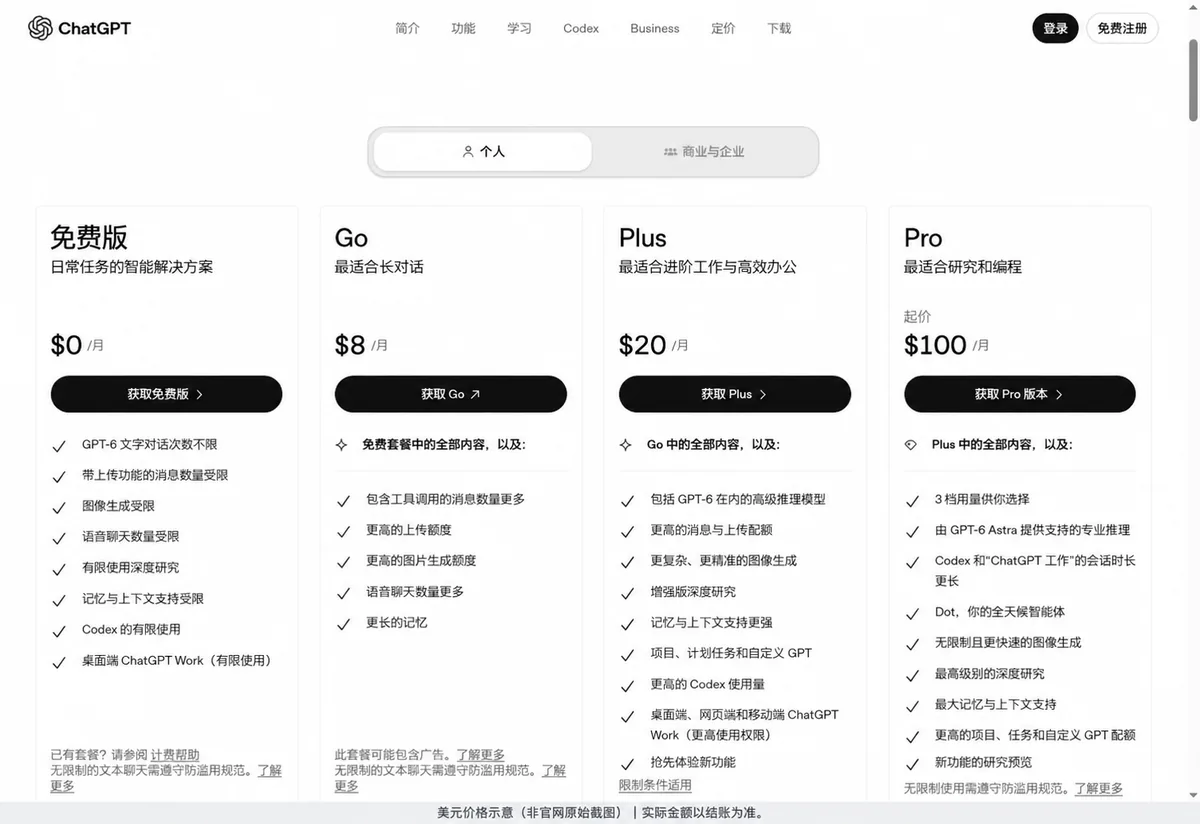
On the account upgrade page, choose the plan and billing cycle you need, and click the buy button on the matching plan to go to the payment page. We use Plus as the example below; when buying other plans, check the amount and renewal cycle against the plan you chose.
Step 3: Pay while matching the PIKABAO card details
Keep the PIKABAO card details page open on one side while filling in the checkout page you reached from the official site. The ChatGPT payment form is on the left and the PIKABAO card face is on the right — each field on the form matches an item on the card, one by one:
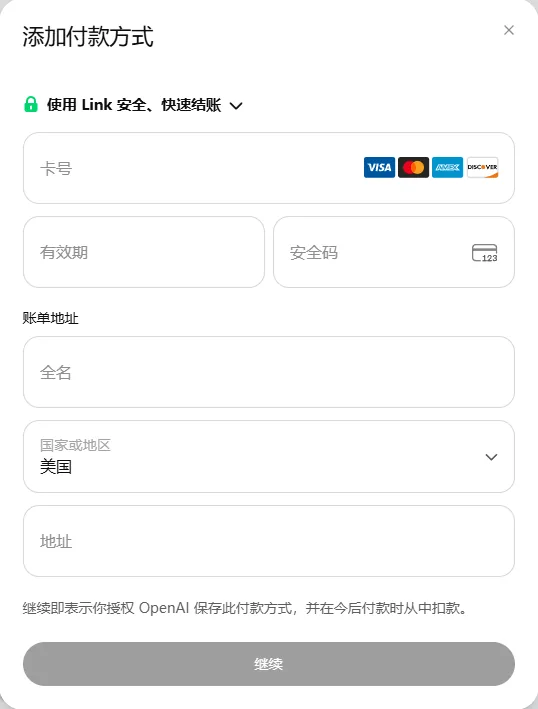 User-provided real screenshot, kept as is. The fields are: ① card number; ② expiry; ③ security code; ④ full name; ⑤ country or region; ⑥ address.
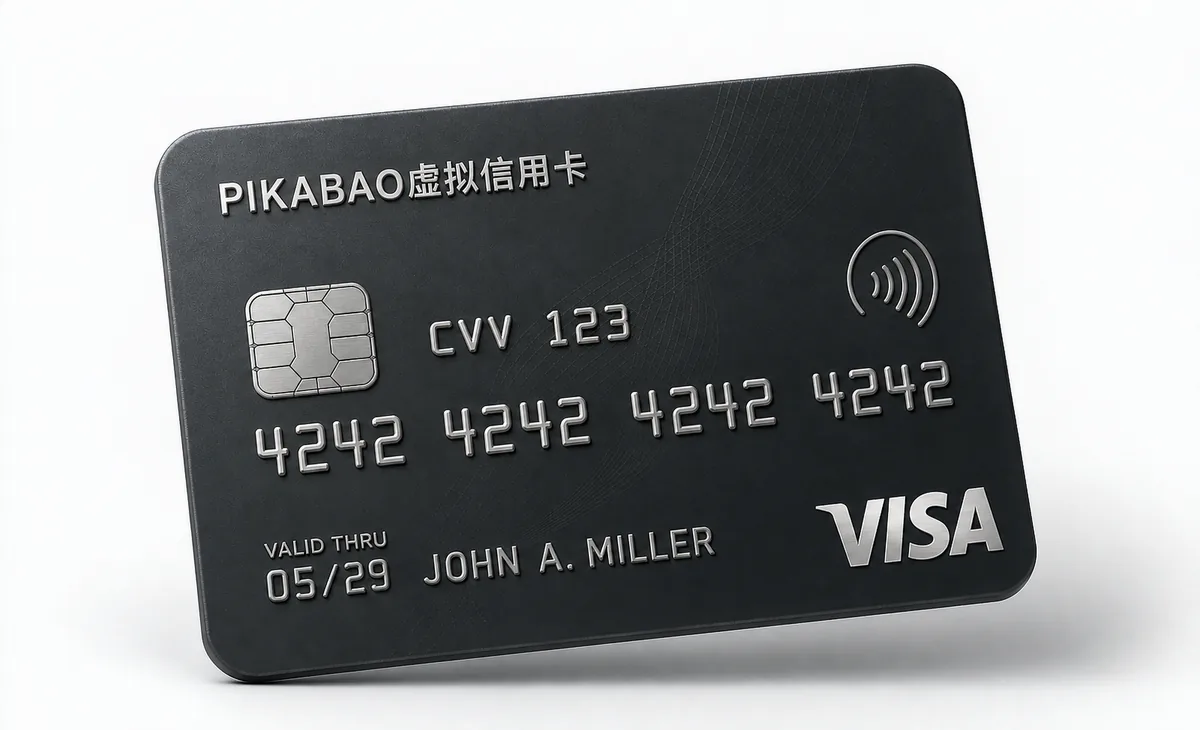 Visa-style sample card face; all card details are fictional.
Fill in the form by matching the card face: card number — enter the full card number; full name — enter the name registered on the card; expiry — enter month / year; security code — enter the CVV / CVC. The card face only shows these four items.
Region and address: open Card details in the PIKABAO dashboard, view and copy the billing country or region, the address registered to this card, plus the city, state and postal code the page asks for, and fill them in on the payment page field by field. How to find them, see Where to find your card number, expiry and CVV and Where does the billing address come from; what blocks you when the address doesn't match, see Will the AVS billing address check block my payment.
Payment field names may vary by region and page language; use an email you can actually receive mail at as the billing email.
A $0 verification generally holds no actual amount. A nonzero authorization may temporarily reduce available funds but is not necessarily a final purchase. Charges, authorization reversals and refunds are distinct states, with timing determined by merchant and issuer processing. An amount alone does not establish verification, duplicate billing or service activation.
Step 4: Complete the payment and confirm the subscription is active
Complete the payment and the verification the card issuer asks for, wait for the platform to show the subscription-success message, then go back to your account to check the plan you've activated.
If the page reports a failure or keeps processing, check the transaction status and the receipt first to avoid paying twice.
Step 5: Confirm your membership and payment receipts
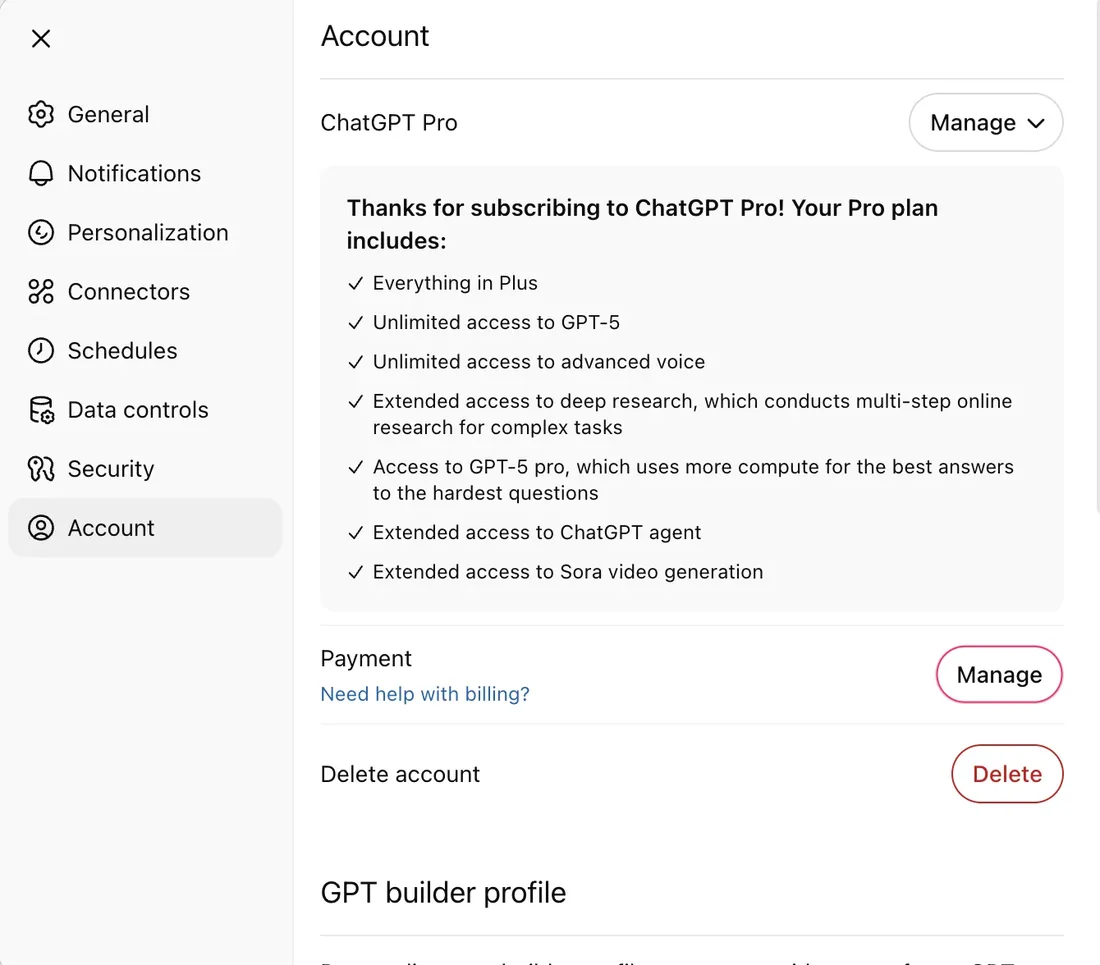
Return to the same account, confirm that the plan shows the membership you bought, and note the next renewal date.
Match the merchant's receipt against the PIKABAO transaction amount, date and status. A card authorization record does not mean the subscription succeeded.
Issuance, Verification and Funding
Registration and verification
Register with an email you can keep receiving messages at and set a password. Complete the required identity verification before first issuance. Google Authenticator two-step verification protects the account: it is not identity verification or a substitute for reviewing identity documents. Use the official dashboard and never disclose passwords or verification codes.
Fee items
Issuing fees start at $1 and vary by segment, with no monthly or annual fee. Account deposits cost $0; card funding costs 3%. The sending service charges any network or withdrawal fees under its own rules. Review issuance, funded amount, funding fee and account deduction before submitting.
Funding calculation
Example: with a $1 issuing fee and $20 funded, the account needs $21.60 ($20 + $0.60 funding fee + $1 issuance). The $20 remains card funds. This is not a universal minimum cost: check the selected segment’s minimum funding and issuing fee.
Acceptance and Separate Web/API Billing
Acceptance
Check the network, card type, issuing region, merchant category, billing mode and authentication support together. Acceptance is decided by the merchant and issuer. Correct addresses, supported advertising categories or one successful payment do not guarantee another payment.
Payment details
Payment details include card number, CVV, expiry date, address, postal code and name; enter the registered details shown for your card. Business name, actual location, tax details and platform eligibility must be checked separately using truthful information. A card address is not a substitute. A BIN describes issuance, not residency or account eligibility.
Web and API
ChatGPT web membership and OpenAI API have separate billing entries. Check their own prices, allowances and requirements. Membership payment does not establish API acceptance or include API credits; do not infer a risk-control ranking without evidence.
Web membership bill
Review the plan and purchase channel in the ChatGPT account. Apple or Google subscriptions use their store billing; a web payment record is not evidence of cancellation in the original store.
API usage bill
Review the separate OpenAI API balance, usage and payment entry. Track API and membership bills separately; membership allowances, card funds and API credits are not interchangeable.
Fund for the Actual Total
Fund for the actual checkout total or next bill, including displayed tax, currency conversion and unsettled amounts. You may leave an extra $1–3 according to the actual bill. This is a balance buffer, not a fixed fee or a universal tax percentage.
| Bill | Check | Funding basis |
|---|---|---|
| Subscription | Plan, cycle, tax and currency | Actual checkout total |
| Renewal or unpaid bill | Issued amount, due date and hold status | Amount actually due |
| Non-USD billing | Merchant currency and card conversion rules | Actual conversion and fee details |
Account balance and each card’s funds are separate. After an account deposit arrives, fund the intended card before using it. Card balance changes with spending and does not reset monthly. Per-transaction and daily limits are read-only; funding does not raise them.
Historical USD screenshots illustrate the interface and plans, not current payable prices everywhere. Investigate differences using tax, conversion, other bills and fee records rather than assuming sales tax.
Payment Issues and Retries
Check the original state
For a payment issue, check the order, receipt, authorization and final charge status to avoid double payment. Use the message to check available funds, read-only limits, card status, registered details, acceptance and authentication. No transaction record is only a clue: it does not prove merchant blocking, that the issuer received nothing or that another card cannot help.
Retry after correction
Retry according to the merchant’s instructions after identifying and correcting the cause. If the status is unclear, contact support instead of repeatedly submitting or issuing test cards. There is no universally safe retry count. Most segments do not charge for declines; charging segments allow 3 free failures per calendar month, then charge $0.40 each from account balance, resetting at the start of the UTC month. Check current segment terms.
Submit evidence safely
Provide the merchant, time, amount, currency, card’s last digits, transaction ID and a redacted screenshot when contacting support. Never send the full card number, CVV, password, verification code or seed phrase. Contact the merchant for order issues and Pikabao support for card or deposit status.
If the account plan differs from the purchase, check the email signed in at purchase, the original channel and the receipt’s service. Do not repurchase the same plan to test whether the first payment worked. Merchant support investigates orders and membership delivery.
Renewals, Replacement and Cancellation
Renewal and replacement
Track the renewal date, payment method and cancellation status in the merchant dashboard. Cancel through the purchase channel. Pikabao sends an expiry reminder one week ahead. Arrange replacement and update the merchant’s payment details; check pending authorizations and refunds before handling the old card. Replacement does not guarantee uninterrupted renewal.
Several-use management
Allocate cards by project, purpose or billing cycle to reconcile bills, distribute funds and manage cards individually. One card per merchant is not mandatory. Separate cards or BINs do not guarantee risk isolation, account independence or higher acceptance. Set budgets and spending caps with the merchant; card funds and read-only limits are not advertising budgets.
Cancel through the purchase channel
Cancel auto-renewal in the purchase channel’s subscription or billing settings and keep confirmation. Web, Apple and Google store subscriptions are managed separately. Freezing or closing a card is not cancellation; check bills already incurred.
Confirm delivery
Check the purchasing or advertising account, order, receipt and final charge. Contact official merchant support if paid but not delivered rather than buying or funding again. Card verification or authorization does not prove membership, credited ad balance or ad delivery.
FAQ
Is ChatGPT payment guaranteed with a virtual card?
Check the network, card type, issuing region, merchant category, billing mode and authentication support together. Acceptance is decided by the merchant and issuer. Correct addresses, supported advertising categories or one successful payment do not guarantee another payment.
Why can the charge differ from the listed price?
Fund for the actual checkout total or next bill, including displayed tax, currency conversion and unsettled amounts. You may leave an extra $1–3 according to the actual bill. This is a balance buffer, not a fixed fee or a universal tax percentage.
How should I investigate a decline with no record?
For a payment issue, check the order, receipt, authorization and final charge status to avoid double payment. Use the message to check available funds, read-only limits, card status, registered details, acceptance and authentication. No transaction record is only a clue: it does not prove merchant blocking, that the issuer received nothing or that another card cannot help.
Can one card serve multiple subscriptions?
Allocate cards by project, purpose or billing cycle to reconcile bills, distribute funds and manage cards individually. One card per merchant is not mandatory. Separate cards or BINs do not guarantee risk isolation, account independence or higher acceptance. Set budgets and spending caps with the merchant; card funds and read-only limits are not advertising budgets.
Are account balance and card limits the same?
Account balance and each card’s funds are separate. After an account deposit arrives, fund the intended card before using it. Card balance changes with spending and does not reset monthly. Per-transaction and daily limits are read-only; funding does not raise them.
Does one failed renewal establish that others will fail?
No. Shared insufficient funds or card-status changes can affect several payments, while merchant declines need individual investigation. Separate cards or BINs do not guarantee independent acceptance.
Can I keep retrying a declined card?
Retry according to the merchant’s instructions after identifying and correcting the cause. If the status is unclear, contact support instead of repeatedly submitting or issuing test cards. There is no universally safe retry count. Most segments do not charge for declines; charging segments allow 3 free failures per calendar month, then charge $0.40 each from account balance, resetting at the start of the UTC month. Check current segment terms.
What if I was charged but membership is inactive?
Check the purchasing or advertising account, order, receipt and final charge. Contact official merchant support if paid but not delivered rather than buying or funding again. Card verification or authorization does not prove membership, credited ad balance or ad delivery.
Where should I cancel auto-renewal?
Cancel auto-renewal in the purchase channel’s subscription or billing settings and keep confirmation. Web, Apple and Google store subscriptions are managed separately. Freezing or closing a card is not cancellation; check bills already incurred.
Does a web subscription cancel an existing app-store subscription?
A web purchase does not establish automatic cancellation. Web, Apple and Google purchases are managed separately. Review and manage renewal through the original channel and keep cancellation confirmation to avoid duplicate subscriptions.
Check Uses and Fees Before Issuing a Pikabao Card
Register and complete required checks, review current segments, merchant requirements and actual fees, then fund the intended card for its bills.