
Step 1: Confirm your service region and complete registration
Open coinbase.com (external source, for verification only, not an endorsement), click Sign up, and follow the page to use your email or phone number, set a password, and confirm the verification code and terms of service. Don't download the app from links in unfamiliar text messages or private chats.
Go to Verify identity and submit your own ID document, selfie or liveness check, and the required proof of residence as prompted. After that, enable two-step verification or a passkey and save your recovery method. Approval doesn't mean every coin, payment method or withdrawal feature is available.
Step 2: Before buying, confirm what PIKABAO accepts
Log in to the dapikabao.com console (your PIKABAO account dashboard), open the account top-up entry, and first confirm the currently supported coins, networks, minimum top-up amount, order validity and fees before deciding how much to buy. Bot and web accounts may use different balances and top-up entries — don't mix them.
Step 3: Link a payment method and buy USDT
Coinbase's official US payment list has no WeChat or Alipay. The following is the payment flow for US accounts; other regions must use whatever their own accounts actually support. Don't use someone else's bank account, and don't let strangers buy or pay on your behalf.
Steps: avatar → Settings → Payment methods → Add a payment method.
Add your own bank account (ACH), a supported debit card or other methods actually offered, and complete the bank connection or verification. The name on the payment account should match your Coinbase verification details; don't assume a PIKABAO virtual card can be used to buy coins.
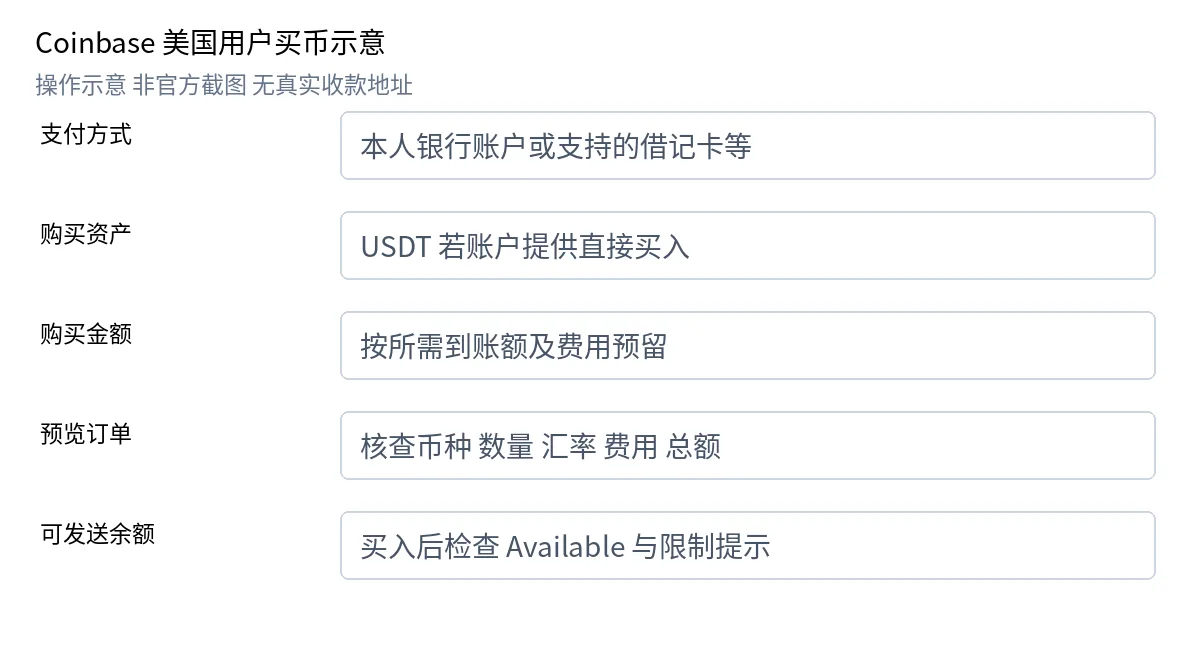
In the Buy entry, search for USDT and confirm it's the exchange asset that can be purchased directly and withdrawn; enter the amount, choose a payment method, and click preview to check the coin, quantity, fees and total payment before confirming. If only DEX assets are shown or USDT can't be bought, don't continue with that asset per this article.
After a successful purchase, check your asset balance and the Available withdrawable balance. Bank funds may have a holding period: being able to trade doesn't mean you can send immediately; wait for the available date your account shows, and support can't shorten the holding period arbitrarily. See Coinbase · Available balance FAQ (external source, for verification only, not an endorsement).
Step 4: Get your PIKABAO top-up address and check the network
On PIKABAO's current top-up page, create a top-up order or open your dedicated top-up address, and select the coin and network the page supports; copy the full address and save the order number and payment requirements; if a Memo/Tag is required, you must fill it in as well. Card numbers, email addresses and PIKABAO user IDs are not on-chain receiving addresses.
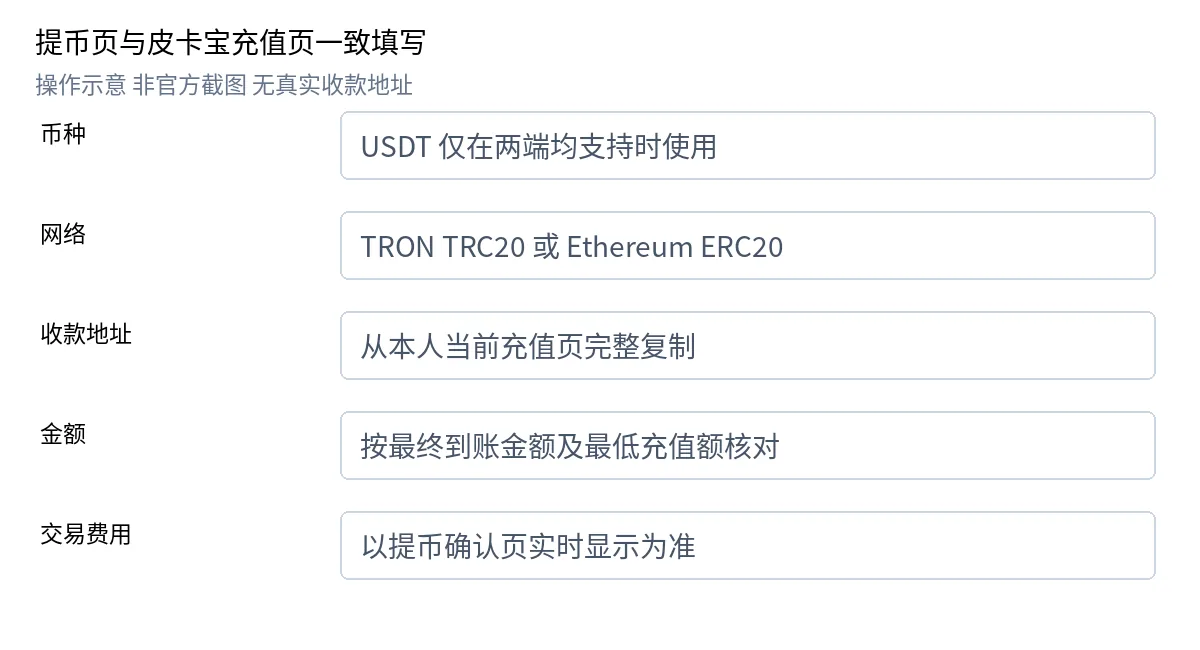
Step 5: Send on-chain from Coinbase
Steps: on web: Dashboard → Send crypto, select the coin and amount → To → choose a supported network and enter the full address → Preview Send. In the app, you can select the asset and receiving address from the Pay entry.
Send using an on-chain address; don't transfer by email, phone number or Coinbase username. If the two sides have no network in common, stop the transfer and contact PIKABAO for an alternative. For the official sending notes, see Coinbase · Send digital assets (external source, for verification only, not an endorsement).
Finally, check the full address, coin, network, fee and final arriving amount, and confirm and verify as the platform requires only after meeting the minimum top-up amount; a first verification transfer must also meet the minimum. Don't send test amounts below the minimum, and don't split the payment yourself.
Step 6: Confirm arrival and move the funds onto your virtual card
After submitting, check the processing status; once broadcast on-chain, save the transaction hash (TxID) and wait for network confirmations and crediting by PIKABAO's top-up system. The exchange showing "Completed" only means the send flow finished; it doesn't guarantee your PIKABAO account balance has been updated.
Confirm the account top-up record shows the funds arrived and check the actual credited amount, then go to card management, select the target card, use the "Move in/Top up" entry in the dashboard to enter the amount, review the fee and card status, and confirm. Budget or shared-balance cards follow their own product rules and may not have a separate card top-up button.
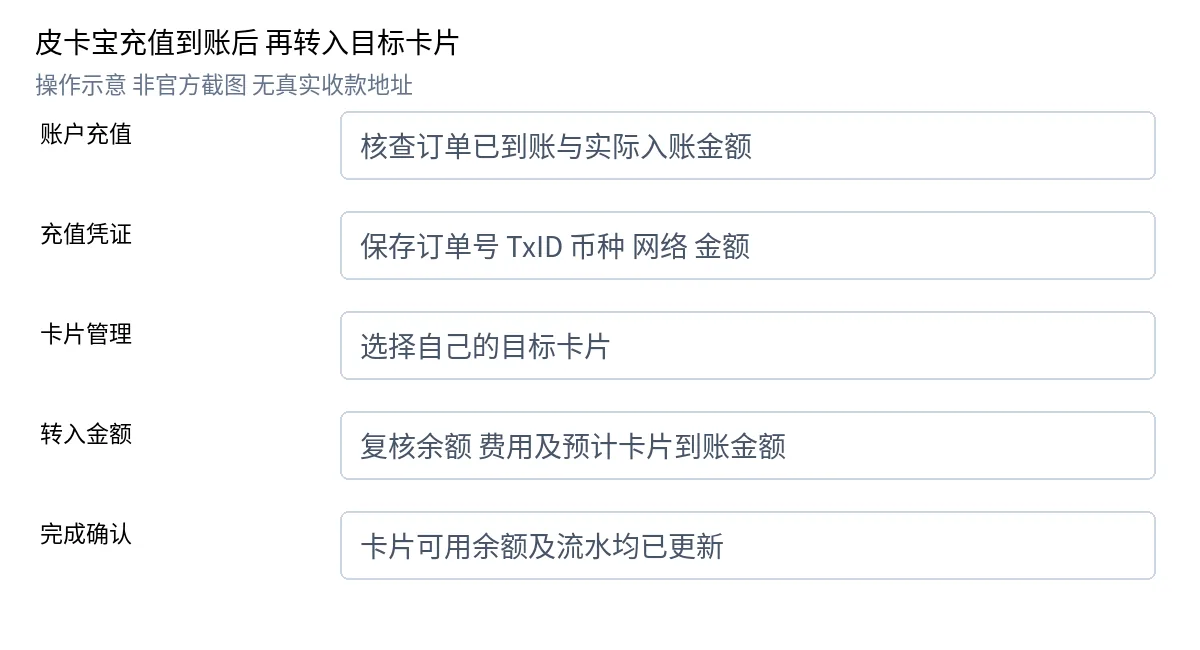
Finally, check the card's available balance, the account deduction and the move-in record — the top-up account balance and the card's spendable balance are two separate things to verify. You can't send USDT to a card number, and receiving USDT doesn't automatically increase the card's USD balance. Menu names, networks, conversion and fees follow what the current pages show.
What to check if the funds haven't arrived
| Situation | What to do first |
|---|---|
| The exchange is still processing | Check the platform's messages and limits; for a bank-funded purchase, first check the holding period and Available balance |
| On-chain but not credited | Check the coin, network, address, amount, minimum, order validity and confirmations, and provide the order number and TxID to PIKABAO support |
| Card balance didn't increase | Check the account arrival record and the card move-in result, and confirm whether the "Move in" step was executed |
Don't pay twice, and never send passwords, verification codes or seed phrases to any support agent. For the troubleshooting order on the PIKABAO side, see What to do first when something goes wrong.
Holding period and Available balance: a Coinbase-specific hurdle
After buying with a bank account on Coinbase, the asset usually has a holding period: it can be traded and shows in your balance, but the Available withdrawable balance is zero or insufficient — withdrawals initiated during this period are blocked. Just wait until the available date your account shows; support can't shorten it arbitrarily. If you need to top up urgently, use another asset source that's already withdrawable instead of going off-exchange to save time.
How to choose the network: what's different about TRC20 and ERC20
PIKABAO only accepts USDT, and only on the TRC20 / ERC20 chains: TRC20 usually arrives in 1–5 minutes, ERC20 usually in 2–10 minutes, the minimum per transfer is 20 USDT (judged by the amount that arrives), account top-up costs $0, and your dedicated address stays valid long-term. Note that whether USDT is buyable on Coinbase and which networks can be withdrawn depend on your region and account eligibility; once a network is chosen, both sides must match. See Supported top-up methods and How long does a deposit take.
After arrival: topping up your card is a separate step
Account balance ≠ card balance. After the money reaches your account, you still need to do a "Move in" in card management; this step charges a flat 3% card top-up fee. The issuing fee starts at $1 with no monthly fee. "Topping up the account" and "moving money onto the card" are two actions with two fees; for the full list, see The total cost of using a card and How deposit fees are calculated. Card balance is a one-time total pool — see What does card balance mean.
The one-line rule
Asked "how do I top up PIKABAO by buying coins on Coinbase"? Remember three boxes: first confirm the requirements (coin / network / minimum), then confirm both sides match, then keep your proof (order number + TxID). If you can't send after buying, check the Available withdrawable balance; if the funds haven't arrived, verify first, then contact support — and never pay twice.
Frequently asked questions
Can I buy coins with WeChat or Alipay on Coinbase?
No. Coinbase's official US payment list has no WeChat or Alipay; other regions go by what their accounts actually offer. Without a locally supported payment method, you can't complete a direct fiat purchase.
Does PIKABAO accept coins other than USDT?
No. Account top-ups only accept USDT, and only on the TRC20 / ERC20 chains; other assets such as USDC aren't supported, so don't send other coins.
Why can't I withdraw right after buying?
Bank funds may have a holding period: being able to trade doesn't mean you can send immediately. Go by the Available withdrawable balance, wait for the available date your account shows, and support can't shorten the holding period arbitrarily.
Can I send with Coinbase Wallet?
This tutorial covers the Coinbase.com trading account. Coinbase Wallet / Base is a self-custody wallet with a different network and address system. When sending from a self-custody wallet, you still need to make sure the network on both sides matches.
What's the minimum top-up?
The minimum per transfer is 20 USDT, judged by the amount that arrives. Transfers below the minimum (including test amounts) may not be credited; the amount is based on what arrives after the fee is deducted, as shown on the send confirmation page.
Is an address starting with 0x always ERC20?
No. Address formats may be identical across chains; the network is decided by what both pages select, never inferred from the address format. Addresses on other networks that also start with 0x can't be treated as Ethereum.
Can I transfer to other Coinbase users by email or phone number?
No. Topping up PIKABAO must be done by sending to an on-chain address; don't transfer by email, phone number or Coinbase username. If the other side has no network in common with you, stop and contact PIKABAO for an alternative.
The exchange shows Completed but PIKABAO hasn't credited — what now?
"Completed" only means the send flow finished. First wait for network confirmations and system crediting; if it times out, check the coin, network, address and confirmation count, and contact PIKABAO support with the order number and TxID. Don't pay twice.
The deposit arrived — why hasn't my card balance changed?
Account balance and card balance are two layers: after the money reaches your account, you still need to do a "Move in" in card management, which charges a flat 3% card top-up fee. After moving the funds, check the card's available balance and the move-in record.
Requirements and maintenance
The illustrated steps cover "buying USDT on Coinbase to top up PIKABAO". The text and illustrations correspond to the 2026-10-12 version of the illustrated tutorial "Coinbase registration, buying and PIKABAO top-up" (all details in the illustrations are fictional examples and must not be used for real payments); the latter part condenses the current wording on this site's product pages and FAQ pages. Fees follow the current rates: account top-up $0, card top-up a flat 3%, issuing fee from $1.
Coinbase's account opening, payment methods and sending rules follow its current official documentation: Create an account (external source, for verification only, not an endorsement), Add a payment method (external source, for verification only, not an endorsement), Send digital assets (external source, for verification only, not an endorsement), Available balance (external source, for verification only, not an endorsement), Regulatory reference · PBOC announcement (external source, for verification only, not an endorsement). Platform rules may change at any time; always go by the current official documentation.
Got USDT? Open a card and try it
The issuing fee and every other fee are listed item by item on the pricing page; the card opening page shows in real time what this one will cost, so check carefully before submitting.