
Step 1: Sign in to Notion and pick the right workspace
Open notion.com (external source, for verification only, not an endorsement) (Notion's official site), click Log in, and use the workspace switcher to choose the workspace you want to upgrade. Upgrades apply only to the current workspace; use a workspace-owner account that has upgrade permissions.
In the sidebar, go to Settings → Upgrade plan or Explore plans, find Business, and choose Upgrade.
Path:notion.com → Log in → workspace switcher → Settings → Upgrade plan → Business.
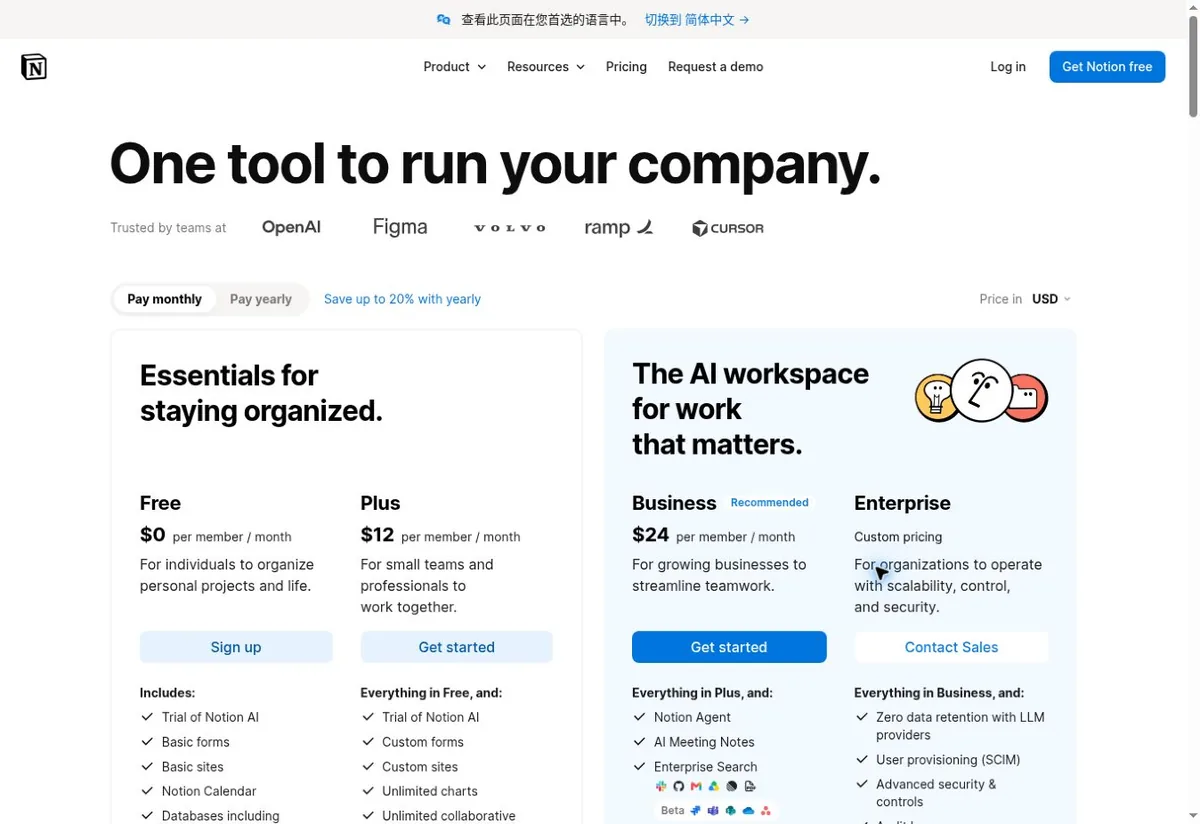
Step 2: Choose the Business tier and billing cycle
Notion AI is currently available in the Business and Enterprise tiers; Free and Plus only get limited access — don't follow old tutorials looking for a separate AI monthly add-on button.
| Plan | Standard monthly | Annual or offers | Best for |
|---|---|---|---|
| Free | Free | Not applicable | Limited AI access only |
| Plus | $12 per member | $120 per member per year | Collaboration features with limited AI access |
| Business | $24 per member | $240 per member per year | The main paid entry that includes Notion AI |
| Enterprise | Contact sales | Contact sales | Enterprise controls and Notion AI |
The prices are fictional illustrative data in the image, used only to show plan tiers and billing cycles; the actual unit price, seat count and taxes follow the checkout page on your own account at the time.
Business monthly billing is $24 per member, and annual billing works out to about $20 per member per month (about $240 per member per year). Notion bills per member, per workspace: multiple paid workspaces on one account are billed separately, adding members adds to the bill, so check the number of paid seats before paying. Advanced models, Custom Agents and similar features may consume extra Notion credits; Business including AI doesn't mean all advanced AI usage is unlimited or free.
Step 3: Fill in payment details by matching the PIKABAO card information
Check the upgrade order summary, the current workspace, the billed seats and the cycle; after filling in or selecting a card, click the final confirmation button such as Upgrade now only when the amount due is correct. The payment form fields map one-to-one to the PIKABAO card-face information:
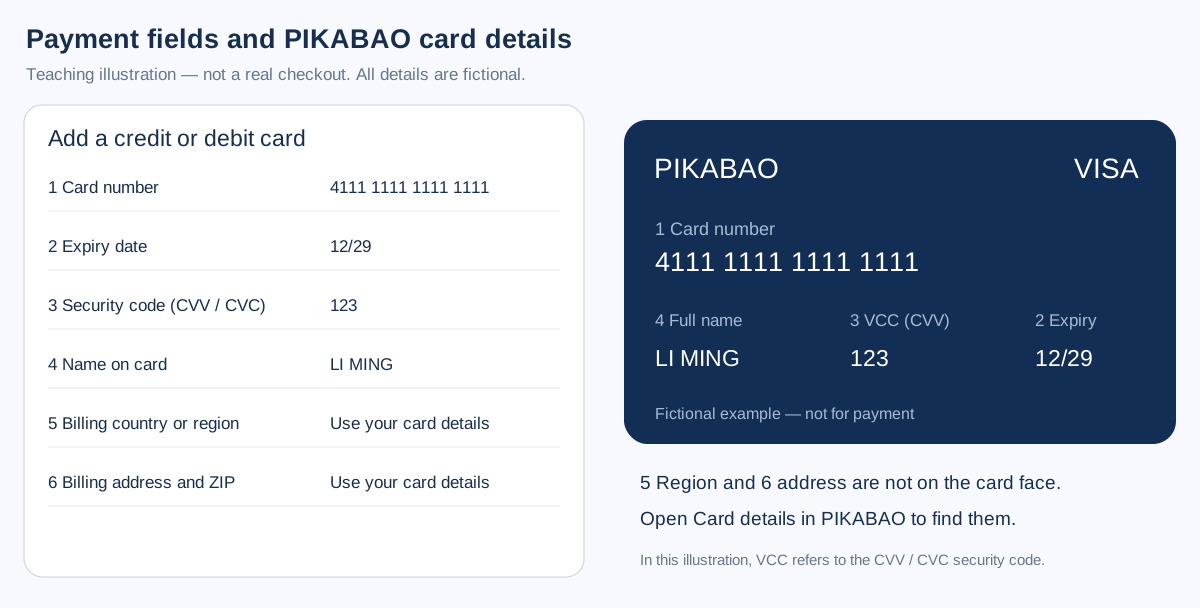
Notion's upgrade dialog asks for the card number, expiry, CVC and cardholder name on one screen and the billing address below it. Copy them from PIKABAO → Card details and match the last four digits before confirming; the name field wants the name printed on the card, not the workspace owner's display name. See Where to find your card number, expiry and CVV.
Billing address: it belongs to the card, not to the workspace. Fill in the country, city, state and ZIP exactly as PIKABAO → Card details shows them; Notion checks the postal code against the country, and a mismatch fails before the charge is attempted. See Where does the billing address come from and Will the AVS check block payment.
Notion bills every member of the workspace, so the card has to cover seats × unit price, not a single seat. Pick a card whose limit sits comfortably above the seat total — a card sized for one subscription passes the first month and then fails the moment a teammate is invited.
Step 4: Pay and confirm the subscription succeeded
Before submitting, check the current account, workspace, seats, billing cycle, amount due, currency, billing email and the last four digits of the payment card; after confirming the auto-renewal terms, click the final payment button such as Upgrade now.
If the bank opens a verification page during the Notion upgrade, complete it the way the card allows and wait for the dialog to return with a success state. Notion holds the upgrade until the payment confirms; closing the tab mid-verification leaves the workspace on its old plan with nothing charged.
Go back to Settings → Plans / Billing, and confirm the current workspace is on Business; open Notion AI or Notion Agent from the sidebar to start using it.
Step 5: Confirm your membership and save the payment records
In the workspace Settings → Billing, view the plan, the next bill and the invoice records; an admin with billing permissions downloads the receipts, per the official notes in Notion Help · Billing (external source, for verification only, not an endorsement).
In PIKABAO, open the card and look for a line from NOTION. The workspace switches to Business as soon as the payment confirms, while the card record can stay pending for a while — read both, and take the next bill date shown in Settings → Billing as the one that decides the renewal.
Stop automatic renewal
In the workspace Settings → Billing → Change plan, choose to downgrade to Free and complete the confirmation, and note when the paid plan ends; other items such as purchased credits need to be checked separately — how to get there, see Notion Help · Upgrade or downgrade your plan (external source, for verification only, not an endorsement).
Cancellations and downgrades usually take effect at the end of the billing cycle; removing a member or leaving the workspace isn't the same as cancelling the whole workspace's subscription. Deleting the PIKABAO card, running out of balance or signing out of the account can't replace formally cancelling the subscription on the platform.
Payment failed or membership not showing: four kinds of troubleshooting
Details rejected: the dialog has four card fields plus the address block, and the security code field wants the three digits from the card — not a workspace passcode or an authenticator code. If the details are refused, re-read the number and expiry from PIKABAO before swapping to another card; most rejections are a typo.
Limit too low: Notion charges seats × unit price for the cycle you chose, so the card limit has to cover every member, not just the owner. Annual billing takes the full year at once and is where limits fall short. Compare the invoice total with the available limit before confirming.
Paid but the workspace still says Free: the upgrade applies to the workspace that was open at checkout. Switch workspaces in the sidebar and open Settings → Plans on each one; the money sits on the workspace you selected, not on your account as a whole.
Renewal amount differs: it moves when the seat count changes, when a promo ends, or when purchased credits are used up and topped up separately. Credits and AI usage beyond the plan allowance are billed as their own line items, so the renewal total and the subscription price are two different numbers.
Don't have a card yet? Open one first: what to prepare for card issuance
| Step | What to prepare | Fee and time |
|---|---|---|
| Registration | Email + password, activated via a verification code | About 30 seconds, free |
| Identity verification | Submit genuine identity details under current first-issuance requirements; configure two-step verification separately | Subject to the actual review status and published terms |
| Two-step verification | Configure Google Authenticator as prompted to protect the account with time-based codes | Separate from identity verification; not a substitute for identity review |
| Account top-up | USDT, TRC20 / ERC20 chains only | $0 fee; minimum 20 USDT per deposit |
| Card issuance | Choose a card family and the initial limit (minimum limit 20) | Issuing fee from $1 + 3% service fee on the limit |
Top-ups accept only USDT; Alipay, WeChat and bank cards aren't supported — there's no alternative channel for this step.
To open a card with a limit of 30, the account is actually charged $31.90 (= 30 of card limit + 30×3% service fee + $1 issuing fee), of which only $1.90 is a real fee — the other 30 stays as your spendable limit. The full list of the four charges, see What's the total cost of using a card; the on-site pricing entry is Pricing.
Editorial notes and maintenance
The images are self-made precise field illustrations; no real card-binding or checkout interface from a personal account was captured, and no payment was actually made, so the illustrations are never presented as official screenshots. Review date 2026-09-30. Plans, prices, buttons and eligibility may change; defer to the actual prompts on your own account's official pages.
The fee figures follow the site's current rates: account top-up fee $0, card top-up fee a flat 3%, issuing fee from $1, minimum 20 USDT per deposit, and a minimum total outlay of $21.6 to issue and top up (minimum card limit $20 + $1 issuing fee + $0.60 service fee). On the Notion side, billing and help follow the official current statements; the entries are Notion's official pricing page (external source, for verification only, not an endorsement) and Notion Help · Billing (external source, for verification only, not an endorsement).
Frequently asked questions
Can Notion AI still be added on separately?
No — don't follow old tutorials looking for a separate AI monthly add-on button. Notion AI is now included in the Business and Enterprise tiers, and Free and Plus only get limited access; to actually use AI, upgrade to Business directly.
How much is Notion Business per month? Is it charged per person?
It's billed per member: Business monthly is $24 per member, and annual works out to about $20 per member per month (about $240 per member per year). The total is the unit price × the number of paid seats + taxes; check the seats before paying.
If two workspaces on one account are both upgraded, will I be charged twice?
Yes. Notion bills per member, per workspace, and multiple paid workspaces are billed separately; adding members also adds to the bill. The upgrade applies only to the workspace selected at checkout.
Is Notion AI usage unlimited?
Business includes Notion AI, but advanced models, Custom Agents and similar features may consume extra Notion credits; including AI doesn't mean all advanced usage is unlimited or free — watch for the credits-related items on your bill.
Do I need to fill in an address when binding a card for Notion? What if it's not on the card?
Yes. The billing country or region and the address aren't shown on the card face; open "Card details" in the PIKABAO backend to view them and fill them into the payment page fields separately; don't make up an address. A mismatched address can be blocked by the AVS check.
Notion charged me but the workspace is still Free — what should I check first?
First check whether the workspace selected at checkout matches the workspace you're currently signed into, then go back to Settings → Plans / Billing to see the order status. The upgrade applies only to the workspace selected at checkout — picking the wrong workspace is a common cause.
Where do I cancel the Notion subscription?
In the workspace Settings → Billing → Change plan, downgrade to Free and complete the confirmation; it usually takes effect at the end of the billing cycle. Removing a member or leaving the workspace doesn't mean the whole workspace subscription is cancelled.
Is subscribing to Notion Business with a virtual card reliable?
On a card family that supports this merchant, it's a standard scenario: when the BIN's issuing country, the merchant category and the billing address line up, subscription payments generally go through. If the card balance is insufficient on the renewal date, the renewal fails — remember to leave room for the tax-inclusive total based on the seats.
The charge was higher on the renewal day — is the platform overcharging?
First check taxes, seat changes, the annual billing cycle and credits purchases. More seats are the most common reason for an amount change; the difference isn't a fee the platform collects — it's the merchant settling by seats and taxes.
Open a card and get your Notion AI subscription started
Opening a card costs from $1 with no monthly fee; top-ups accept USDT only. One Business seat needs about $25.72 of card balance for a $24 month.